‘systemctl –failed’ tells you something broke, not why. This Ruby script pairs each failed unit with its failure class, exit status and last log lines, then tells you what to do next.
Step through the build below:
After a deploy or reboot you run systemctl --failed and get a list of names. The real triage then happens by hand: systemctl status, journalctl -u, working out whether it was a timeout, an OOM kill or a restart loop. systemd already exposes the failure class in Result=; this script automates the loop, maps each class to a concrete next step and prints the last log lines, so the first minute of an incident is one command.
#!/usr/bin/env ruby
# frozen_string_literal: true
#
# failed_units.rb - turn `systemctl --failed` into a triage report: WHY did it fail, and what did it log?
# Ruby 3.0+, stdlib only, systemd 250+ (for --output=json). Usage:
#   ruby failed_units.rb [--lines 3] [--json] [--input units.json] [--user]
#   --input   read a saved `systemctl list-units --failed --output=json` instead of running it
require 'open3'
require 'json'
require 'optparse'
# Result= values from `systemctl show` and what an operator should do about each.
ADVICE = {
  'exit-code'      => 'Process exited non-zero. Read the log lines; run ExecStart by hand as the unit user.',
  'signal'         => 'Killed by a signal (segfault/abort). Check coredumpctl.',
  'core-dump'      => 'Crashed with a core dump. Run: coredumpctl info <unit>.',
  'timeout'        => 'Start/stop timed out. Raise TimeoutStartSec= or fix a hanging dependency.',
  'oom-kill'       => 'Out-of-memory kill. Raise MemoryMax= or fix the leak.',
  'start-limit-hit'=> 'Restarted too fast. Fix the crash, then `systemctl reset-failed`.',
  'resources'      => 'Could not fork/allocate. Check limits, cgroups and free memory.',
  'dependency'     => 'A required unit failed first; fix that one.',
  'protocol'       => 'Service violated its Type= protocol (e.g. never sent READY).'
}.freeze
def sh(*cmd)
  out, _err, st = Open3.capture3(*cmd)
  st.success? ? out : ''
end
def failed_units(opts)
  if opts[:input]
    JSON.parse(File.read(opts[:input]))
  else
    args = ['systemctl', *(opts[:user] ? ['--user'] : []), 'list-units', '--failed', '--all', '--output=json', '--no-pager']
    JSON.parse(sh(*args).then { |o| o.empty? ? '[]' : o })
  end
end
def details(unit, opts)
  return {} if opts[:input] && !opts[:live]
  show = sh('systemctl', *(opts[:user] ? ['--user'] : []), 'show', unit, '-p', 'Result,ExecMainStatus,ActiveEnterTimestamp,NRestarts')
  show.lines.to_h { |l| l.chomp.split('=', 2) }
end
def recent_log(unit, opts)
  return [] if opts[:input] && !opts[:live]
  sh('journalctl', *(opts[:user] ? ['--user'] : []), '-u', unit, '-n', opts[:lines].to_s, '--no-pager', '-o', 'cat').lines.map(&:chomp)
end
opts = { lines: 3, json: false }
OptionParser.new do |o|
  o.on('--lines N', Integer) { |v| opts[:lines] = v }
  o.on('--json') { opts[:json] = true }
  o.on('--input FILE') { |v| opts[:input] = v }
  o.on('--live', 'with --input, still query systemctl/journalctl per unit') { opts[:live] = true }
  o.on('--user') { opts[:user] = true }
end.parse!
report = failed_units(opts).map do |u|
  name = u['unit']
  d = details(name, opts)
  result = d['Result'] || u['sub']
  { unit: name, description: u['description'], active: u['active'], sub: u['sub'],
    result: result, exit_status: d['ExecMainStatus'], restarts: d['NRestarts'],
    advice: ADVICE.fetch(result, 'See `systemctl status` and the journal.'), log: recent_log(name, opts) }
end
if opts[:json]
  puts JSON.pretty_generate(report)
else
  puts report.empty? ? 'No failed units. All good.' : "#{report.size} failed unit(s)"
  report.each do |r|
    puts "\n#{r[:unit]}  [#{r[:result]}#{r[:exit_status] ? ", status=#{r[:exit_status]}" : ''}]  #{r[:description]}"
    puts "  advice: #{r[:advice]}"
    r[:log].each { |l| puts "  log: #{l}" }
  end
end
exit(report.empty? ? 0 : 2)
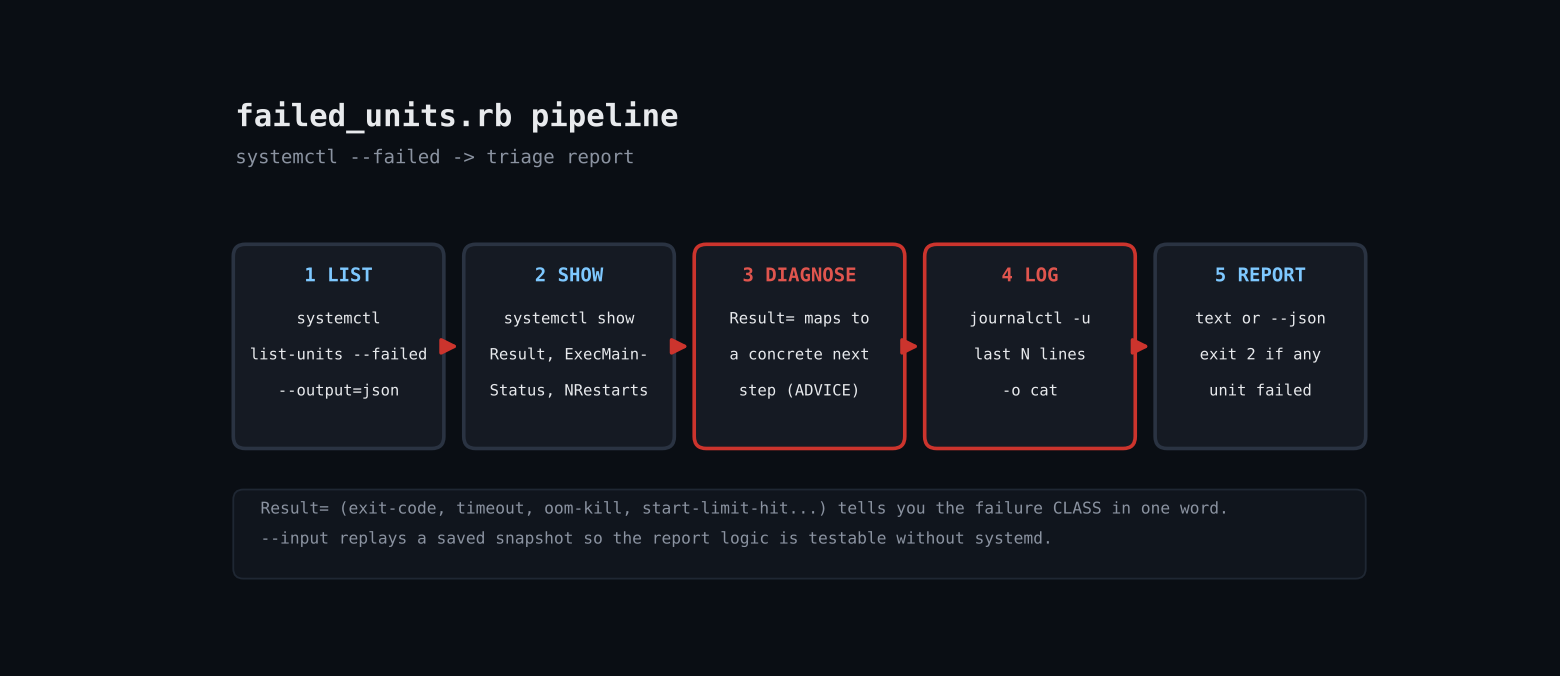
1. List failed units — systemctl list-units --failed --all --output=json returns a JSON array that JSON.parse consumes directly, no column scraping.
2. Query each unit — systemctl show -p Result,ExecMainStatus,NRestarts prints stable KEY=value lines, parsed with to_h.
3. Map Result to advice — A frozen ADVICE hash maps exit-code, timeout, oom-kill, start-limit-hit and others to what you should do next.
4. Tail the journal — journalctl -u UNIT -n N -o cat gives the last lines with timestamps stripped for compact reports.
5. Exit code — Exit status 2 when anything failed, 0 when clean — so it doubles as a deploy gate.
$ ruby failed_units.rb (captured in sandbox)
$ ruby failed_units.rb --input units.json
3 failed unit(s)
backup.service  [failed]  Nightly backup
  advice: See `systemctl status` and the journal.
app.service  [timeout]  App server
  advice: Start/stop timed out. Raise TimeoutStartSec= or fix a hanging dependency.
cache.service  [oom-kill]  Redis cache
  advice: Out-of-memory kill. Raise MemoryMax= or fix the leak.
$ ruby failed_units.rb   # live host, nothing failed
No failed units. All good.
Full script + README on GitHub: ruby-devops-toolkit/failed-units-report
Why this matters
After a deploy or reboot you run systemctl --failed and get a list of names. The real triage then happens by hand: systemctl status, journalctl -u, working out whether it was a timeout, an OOM kill or a restart loop. systemd already exposes the failure class in Result=; this script automates the loop, maps each class to a concrete next step and prints the last log lines, so the first minute of an incident is one command.
What you need
- Ruby 3.0+ (tested on 3.3.6), stdlib only
- systemd 250+ for
list-units --output=json - Permission to read the journal (root or
systemd-journalgroup)
Complete code
#!/usr/bin/env ruby
# frozen_string_literal: true
#
# failed_units.rb - turn `systemctl --failed` into a triage report: WHY did it fail, and what did it log?
# Ruby 3.0+, stdlib only, systemd 250+ (for --output=json). Usage:
#   ruby failed_units.rb [--lines 3] [--json] [--input units.json] [--user]
#   --input   read a saved `systemctl list-units --failed --output=json` instead of running it
require 'open3'
require 'json'
require 'optparse'
# Result= values from `systemctl show` and what an operator should do about each.
ADVICE = {
  'exit-code'      => 'Process exited non-zero. Read the log lines; run ExecStart by hand as the unit user.',
  'signal'         => 'Killed by a signal (segfault/abort). Check coredumpctl.',
  'core-dump'      => 'Crashed with a core dump. Run: coredumpctl info <unit>.',
  'timeout'        => 'Start/stop timed out. Raise TimeoutStartSec= or fix a hanging dependency.',
  'oom-kill'       => 'Out-of-memory kill. Raise MemoryMax= or fix the leak.',
  'start-limit-hit'=> 'Restarted too fast. Fix the crash, then `systemctl reset-failed`.',
  'resources'      => 'Could not fork/allocate. Check limits, cgroups and free memory.',
  'dependency'     => 'A required unit failed first; fix that one.',
  'protocol'       => 'Service violated its Type= protocol (e.g. never sent READY).'
}.freeze
def sh(*cmd)
  out, _err, st = Open3.capture3(*cmd)
  st.success? ? out : ''
end
def failed_units(opts)
  if opts[:input]
    JSON.parse(File.read(opts[:input]))
  else
    args = ['systemctl', *(opts[:user] ? ['--user'] : []), 'list-units', '--failed', '--all', '--output=json', '--no-pager']
    JSON.parse(sh(*args).then { |o| o.empty? ? '[]' : o })
  end
end
def details(unit, opts)
  return {} if opts[:input] && !opts[:live]
  show = sh('systemctl', *(opts[:user] ? ['--user'] : []), 'show', unit, '-p', 'Result,ExecMainStatus,ActiveEnterTimestamp,NRestarts')
  show.lines.to_h { |l| l.chomp.split('=', 2) }
end
def recent_log(unit, opts)
  return [] if opts[:input] && !opts[:live]
  sh('journalctl', *(opts[:user] ? ['--user'] : []), '-u', unit, '-n', opts[:lines].to_s, '--no-pager', '-o', 'cat').lines.map(&:chomp)
end
opts = { lines: 3, json: false }
OptionParser.new do |o|
  o.on('--lines N', Integer) { |v| opts[:lines] = v }
  o.on('--json') { opts[:json] = true }
  o.on('--input FILE') { |v| opts[:input] = v }
  o.on('--live', 'with --input, still query systemctl/journalctl per unit') { opts[:live] = true }
  o.on('--user') { opts[:user] = true }
end.parse!
report = failed_units(opts).map do |u|
  name = u['unit']
  d = details(name, opts)
  result = d['Result'] || u['sub']
  { unit: name, description: u['description'], active: u['active'], sub: u['sub'],
    result: result, exit_status: d['ExecMainStatus'], restarts: d['NRestarts'],
    advice: ADVICE.fetch(result, 'See `systemctl status` and the journal.'), log: recent_log(name, opts) }
end
if opts[:json]
  puts JSON.pretty_generate(report)
else
  puts report.empty? ? 'No failed units. All good.' : "#{report.size} failed unit(s)"
  report.each do |r|
    puts "\n#{r[:unit]}  [#{r[:result]}#{r[:exit_status] ? ", status=#{r[:exit_status]}" : ''}]  #{r[:description]}"
    puts "  advice: #{r[:advice]}"
    r[:log].each { |l| puts "  log: #{l}" }
  end
end
exit(report.empty? ? 0 : 2)
Step by step
- List failed units.
systemctl list-units --failed --all --output=jsonreturns a JSON array thatJSON.parseconsumes directly, no column scraping. - Query each unit.
systemctl show -p Result,ExecMainStatus,NRestartsprints stableKEY=valuelines, parsed withto_h. - Map Result to advice. A frozen
ADVICEhash mapsexit-code,timeout,oom-kill,start-limit-hitand others to what you should do next. - Tail the journal.
journalctl -u UNIT -n N -o catgives the last lines with timestamps stripped for compact reports. - Exit code. Exit status 2 when anything failed, 0 when clean — so it doubles as a deploy gate.
What it prints
$ ruby failed_units.rb --input units.json
3 failed unit(s)
backup.service  [failed]  Nightly backup
  advice: See `systemctl status` and the journal.
app.service  [timeout]  App server
  advice: Start/stop timed out. Raise TimeoutStartSec= or fix a hanging dependency.
cache.service  [oom-kill]  Redis cache
  advice: Out-of-memory kill. Raise MemoryMax= or fix the leak.
$ ruby failed_units.rb   # live host, nothing failed
No failed units. All good.
When it misbehaves
- Honest testing note: the sandbox has no running systemd, so the live path was only exercised on a host with nothing failed (prints the all-good message). The triage output above was produced from a saved JSON snapshot via
--input; in that mode Result comes from the snapshot’ssubfield and per-unitsystemctl show/ journal lookups are skipped unless you add--live. - Unknown option –output=json: systemd older than ~250; use
--plainand parse columns instead. - Empty logs: add your user to
systemd-journalor run with sudo. - User services: pass
--user.
Where to take it next
- Post the JSON to Slack or a chat webhook
- Auto-run
systemctl reset-failedafter a ticket is filed - Include
coredumpctlsummary for core-dump results - Group by dependency chain using
systemctl list-dependencies --reverse