Most agent demos optimize the happy path. Flowise AgentFlow V2 optimizes the stop: the human approval gate is a node on the canvas, the pause is checkpointed, and the run survives a restart. Here is how to put that to work in DevOps and security.
See the workflow in action, tap through the tabs below:
// node 18.15.0 or 20+ required
npm install -g flowise
npx flowise start
# open http://localhost:3000
// Start node: declare every state key up front
{
  "cve_list": [],
  "severity": "",
  "blast_radius": "",
  "approved_by": "",
  "ticket_id": ""
}
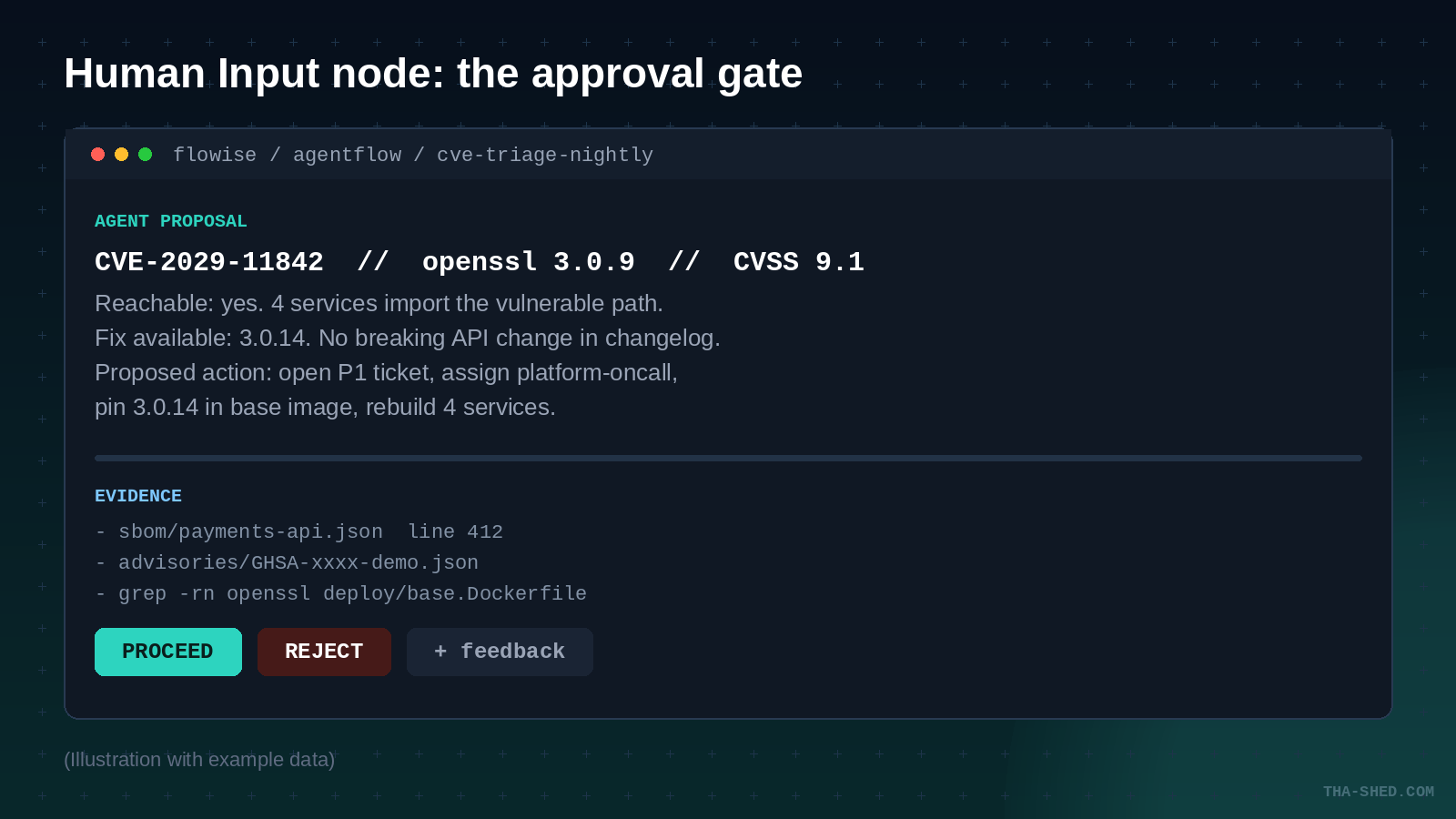
Human Input node. Execution pauses without blocking the thread. The checkpoint is saved, so the run resumes at the same node even after the app restarts.
Two output anchors, proceed and reject, each wired to a different path. Turn on Feedback and the reviewer comment gets appended to the node output, which means your audit trail writes itself.
Per tool, the Agent node also carries a Require Human Input flag. Use it on anything that writes.
// every flow is an HTTP endpoint
curl -X POST http://localhost:3000/api/v1/prediction/YOUR_FLOW_ID \
  -H "Authorization: Bearer YOUR_API_KEY" \
  -H "Content-Type: application/json" \
  -d '{"question":"triage advisories from the last 24h"}'
Flow State is not memory. It lives for one execution and is destroyed when that run ends. It does not carry across sessions.
New keys cannot be created mid run. Operational nodes can only update keys you declared in the Start node.
Custom Function runs server side JavaScript inside your Flowise process. Allowlist specific modules with TOOL_FUNCTION_EXTERNAL_DEP instead of opening everything.
Loop node defaults to 5 iterations. That ceiling is the only thing between you and a very expensive infinite cycle.
What Flowise actually is in 2026
Flowise is an open source, self-hostable visual builder for LLM apps and agents. You drag nodes onto a canvas, wire them together, and the result is an HTTP endpoint you can curl. That much has been true for a while. What changed is AgentFlow V2.
V1 leaned on external frameworks for the agent graph logic. V2 rebuilt orchestration as native Flowise nodes, which means the canvas is the control flow rather than a polite suggestion about it. Loops, conditional branches, iteration over arrays, and human approval gates are all first class nodes you can point at.
That distinction is the entire pitch for our crowd. When an exec asks why an agent opened a P1 at 3am, "here is the node that decided, and here is the node where Ops clicked proceed" is an answer. "The framework chose" is not.
Quick setup
Node 18.15.0 or 20 and above. Two commands and you are running:
npm install -g flowise
npx flowise start
# http://localhost:3000
Docker Compose works too. Clone the repo, copy docker/.env.example to .env, then docker compose up -d. For anything past a weekend experiment, set DATABASE_TYPE=postgres so your flows are not living in a SQLite file in somebody home directory.
Flowise Cloud exists if you do not want to babysit a server:
- Free: 100 predictions a month, 5 MB storage. Fine for kicking tires.
- Starter: around $35 a month, unlimited flows, 10,000 predictions, 1 GB.
- Pro: around $65 a month, 50,000 predictions, 10 GB, 5 users with admin roles, extra seats billed per user.
- Enterprise: custom pricing, and this is the tier that carries on-prem deployment, SSO, RBAC, and audit logs.
One thing the pricing page will not shout at you: none of those tiers include your model spend, vector store, or third party API costs. The subscription is the smallest line on the bill. Budget for tokens separately.
For DevOps and security work, self-host. You want the agent sitting inside your network, reading your artifacts, with credentials you control. That is not a preference, it is the whole reason to pick a tool like this over a hosted assistant.
The mindset: design for the stop, not the run
Every agent tutorial teaches you to build the happy path. Then the thing ships, and the first real incident is an agent confidently doing something irreversible at scale.
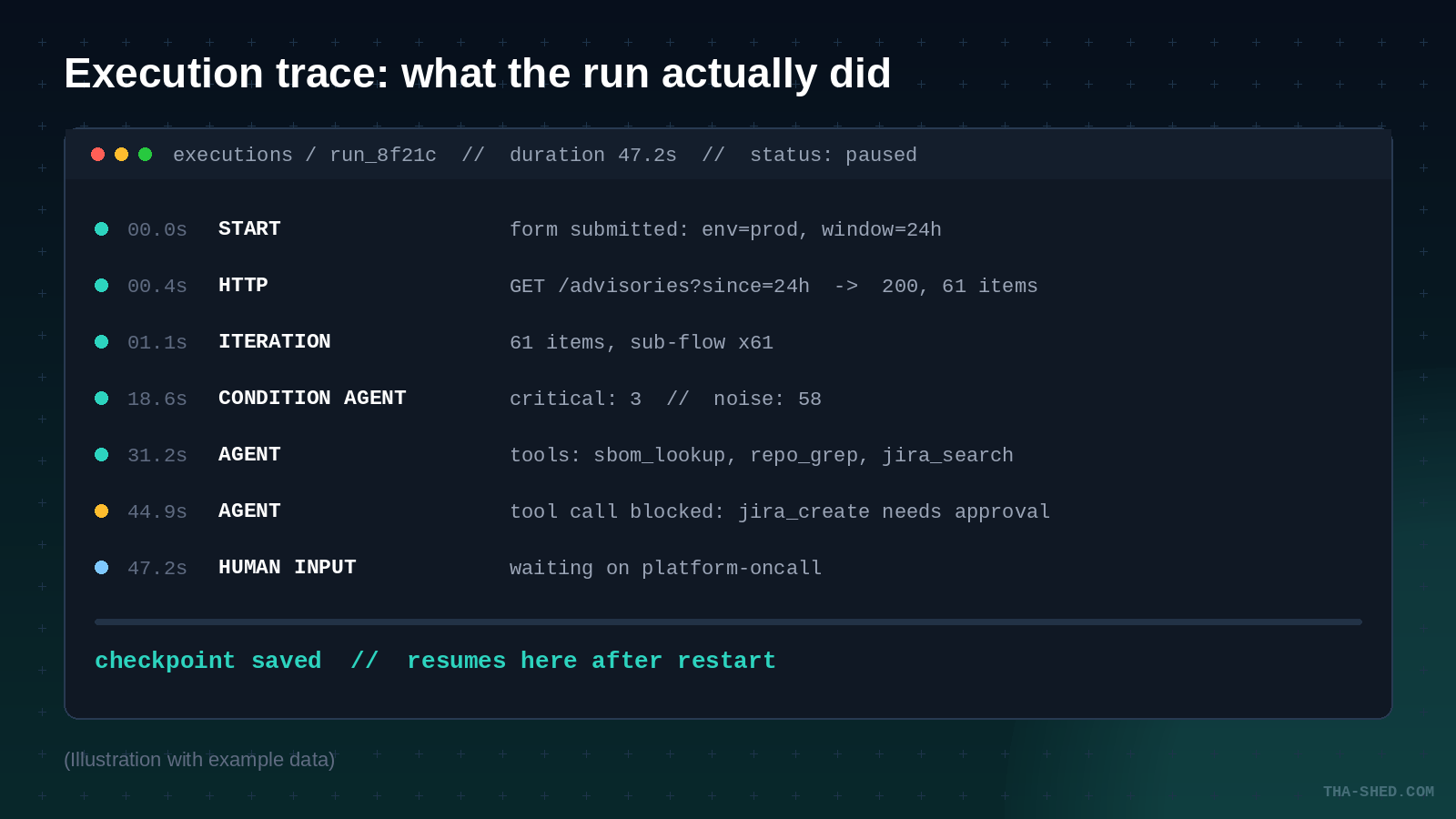
Flowise gives you a specific answer to that, and it is worth internalizing before you build anything. The Human Input node pauses execution without blocking the running thread, and the checkpoint is saved. The workflow resumes from the same point even after the application restarts. Long running, stateful agents that wait on a person are a supported pattern, not a hack.
So design backwards. Find the irreversible action first: the ticket that gets created, the config that gets pushed, the account that gets disabled. Put the gate immediately before it. Build the rest of the flow around that gate. The Agent node also carries a per tool Require Human Input flag, which is the same idea at a finer grain.
If you have read our CrewAI workflows piece, this is the same principle with a different steering wheel. Visual tools make the gate obvious to people who do not read Python.
Seven workflows worth building
1. Nightly CVE triage with a human gate
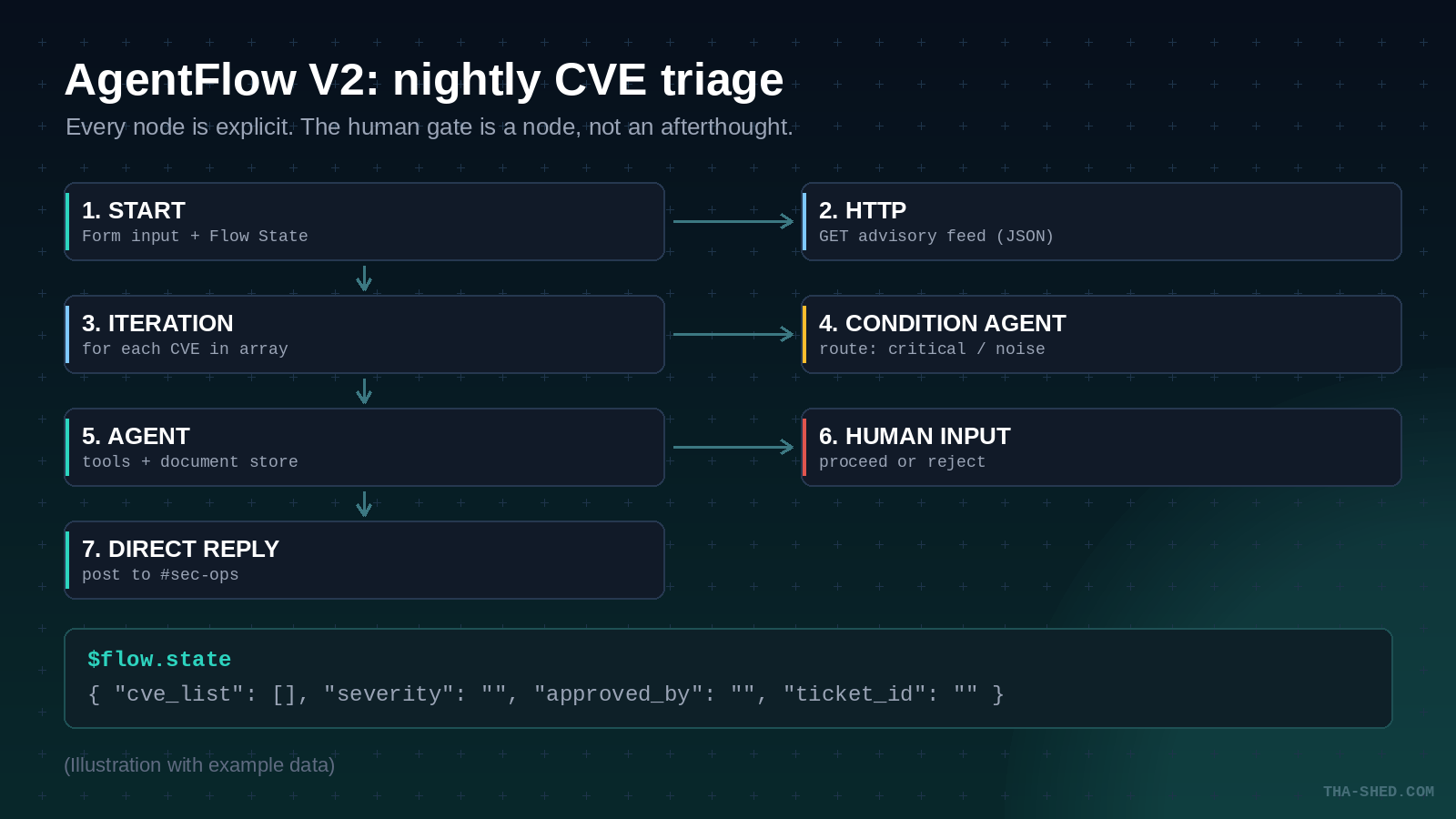
Start node with a form input for environment and lookback window. HTTP node pulls your advisory feed. Iteration node walks the array. Inside the loop, an Agent node with an SBOM lookup tool and a repo grep tool answers one question per CVE: is this actually reachable in our code. Human Input node before any ticket gets created.
The payoff is not speed, it is the noise reduction. Sixty advisories in, three that touch reachable code out.
2. Drift review routed by blast radius
Condition Agent node instead of a rules engine. Give it instructions in plain language and a set of scenarios, and let it route:
Instructions: Classify this infrastructure change by blast radius.
Scenarios:
  - "cosmetic" (tags, descriptions, non-functional metadata)
  - "contained" (single service, no network or IAM change)
  - "wide" (IAM, security groups, shared data stores, DNS)
Cosmetic auto-approves. Contained goes to the owning team channel. Wide goes to a Human Input node. Three output anchors, three paths, zero regex.
3. Runbook drafting from real incident artifacts
Retriever node against a Document Store you have loaded with past postmortems and existing runbooks. It is a focused alternative to a full Agent node when retrieval is the only thing you need. Set Output Format to Text with Metadata so the draft cites which document each step came from. An uncited runbook step is a guess wearing a uniform.
4. Quarterly access review fan-out
This is the Iteration node earning its keep. Feed it an array of users. For each one, the sub-flow pulls group memberships, checks last login, and compares against the role definition. The output is a per user recommendation with evidence attached, not a 400 row spreadsheet that nobody reads.
5. Alert enrichment before the page fires
HTTP node with a Bearer credential, hitting your metrics API, your deploy API, and your on-call schedule. An LLM node with JSON Structured Output turns the three responses into a fixed schema. Your pager gets a paragraph of context instead of a metric name.
6. Postmortem evidence collection
Custom Function node for the ugly parts: normalizing timestamps across four systems, computing a real time to detect, reshaping log output. It runs server side JavaScript and must return a string. Store the result with Update Flow State so the writing node downstream has it.
7. Compose the six above
Execute Flow node calls another flow as a sub-workflow, passes input, optionally overrides config for that one run, and gets the output back. Build "enrich an alert" once, then call it from the triage flow, the drift flow, and the postmortem flow. This is the difference between a demo and a platform.
Safety and the gotchas that will bite you
Flow State is not memory. The runtime key-value store at $flow.state is created when an execution begins and destroyed when it ends. It does not persist across sessions or separate runs, and every concurrent execution gets its own copy. Treat it as scratch space for one run, nothing more.
You cannot create state keys on the fly. Every key has to be declared with a default value in the Start node. Operational nodes can update pre-defined keys only. This trips up everyone once, and it is genuinely the right design: your state schema is visible in one place instead of scattered across fourteen nodes.
Custom Function is code execution inside your Flowise process. By default only certain dependencies are allowed. You can widen that with environment variables, and you should widen it narrowly:
# do this
TOOL_FUNCTION_EXTERNAL_DEP=cheerio,typeorm

# not this
TOOL_FUNCTION_BUILTIN_DEP=*
ALLOW_BUILTIN_DEP=true
The docs specifically flag that some built-in dependencies, Puppeteer among them, carry their own vulnerability surface. Assess before you enable.
MCP tools have their own hardening layer, and it is on by default. Leave it that way. CUSTOM_MCP_SECURITY_CHECK=true enforces a command allowlist (node, npx, python, python3, docker), validates arguments against directory traversal and executable paths, blocks shell metacharacters and command chaining, and prevents modification of critical environment variables like PATH. Disabling it means arbitrary command execution.
Recommended production settings straight from the docs:
CUSTOM_MCP_SECURITY_CHECK=true
CUSTOM_MCP_PROTOCOL=sse
HTTP_SECURITY_CHECK=true
PATH_TRAVERSAL_SAFETY=true
HTTP_DENY_LIST=localhost,127.0.0.1,internal.company.com
That HTTP_DENY_LIST line is the one people skip. An agent with an HTTP node and no deny list is an SSRF primitive with a friendly chat interface. Block your metadata endpoints and your internal admin hosts before you hand anyone the canvas.
Set your encryption key explicitly. Flowise stores third party API keys as encrypted credentials. If the key regenerates or the path moves, you get "Credentials could not be decrypted" across every flow at once. Pin it with FLOWISE_SECRETKEY_OVERWRITE, or move it to AWS Secret Manager with SECRETKEY_STORAGE_TYPE=aws.
The Loop node defaults to a max count of 5. That ceiling is the only thing standing between a retry pattern and a very expensive infinite cycle. Raise it deliberately, never casually.
Keeping the bill honest
Three habits cover most of it.
Filter before you iterate. The Iteration node multiplies everything inside it by the array length. A cheap Condition Agent that drops 58 of 61 items before the expensive Agent node runs is the single highest leverage change you can make.
Mix your models. Routing and classification do not need your best model. Put the small fast one in the Condition Agent and the strong one in the Agent node that does the reasoning.
Turn on Ephemeral Memory for batch runs. A nightly triage job has no business dragging yesterday conversation into today prompt. When you do want memory, use the Window Size and Max Token Limit settings rather than replaying the whole thread.
Then watch the execution traces. Duration and node-by-node status tell you where the tokens went far faster than a billing dashboard will.
FAQ
Is Flowise just a replacement for n8n or Zapier?
No, and the Flowise team addresses this head on. Automation platforms move data between systems on a fixed path. AgentFlow supports agent to agent communication, where a supervisor formulates and delegates tasks to worker agents and gets their output back, with every agent holding the full conversation history. It also treats MCP servers as workflow components rather than only as agent tools. Different job. Plenty of teams run both, and if you want the automation side we covered that in our n8n agent workflows guide.
Can a paused workflow really survive a restart?
Yes. Each Human Input checkpoint is saved, and the workflow resumes from that same point after the application restarts. That is what makes an approval gate practical for a review that might sit until the next business day. Just make sure you are on a real database rather than the default SQLite file if you care about those checkpoints.
Do I need a paid plan to use this with a team?
Self-hosting is free and unlimited on your own hardware, which is where most engineering teams land. The paid Cloud tiers buy you managed hosting, prediction quota, and multi-user admin roles. SSO, RBAC, and audit logs sit behind the Enterprise tier, and self-hosted Enterprise requires a license key from Flowise. If compliance needs the audit log, that is a sales conversation, not a checkbox.
Where to take it next
Build one flow this week. Pick the workflow where a human already reviews everything manually, put a Human Input node where that review happens, and let the agent do the assembly work in front of it. You will know within a week whether the reviewer is clicking proceed on autopilot, which is the only metric that matters.
If the underlying Linux, container, and security fundamentals are the part you want to firm up first, that is exactly what our DevOps Boot Camp is built for. Agents amplify whatever judgment you already have. Sharpen the judgment first.