LangGraph makes you build agents as graphs, wiring exactly which steps a model controls and which stay deterministic. Here is the setup and seven workflows worth stealing.
See the workflow in action, tap through the tabs below:
pip install -U langgraph
# or: uv add langgraph

python -c "from langgraph.graph import StateGraph; print('ready')"
from langgraph.graph import StateGraph, MessagesState, START, END

def classify_rule(state):
    sev = "medium" if "scan" in state["messages"][-1]["content"] else "high"
    return {"severity": sev}

def llm_investigate(state):
    return {"messages": [{"role": "ai", "content": "hypothesis: noisy scan"}]}

graph = StateGraph(MessagesState)
graph.add_node(classify_rule)
graph.add_node(llm_investigate)
graph.add_edge(START, "classify_rule")
graph.add_conditional_edges(
    "classify_rule",
    lambda s: "llm_investigate" if s["severity"] == "medium" else END,
)
graph.add_edge("llm_investigate", END)
app = graph.compile()
from langgraph.checkpoint.memory import InMemorySaver
from langgraph.types import interrupt

def close_or_escalate(state):
    decision = interrupt({"proposed_action": "close ticket, tag noisy-scan"})
    return {"resolution": decision}

checkpointer = InMemorySaver()
app = graph.compile(checkpointer=checkpointer)
app.invoke({"messages": [...]}, config={"configurable": {"thread_id": "ex-48213"}})
# graph pauses at close_or_escalate until you resume it with a Command
from langchain_mcp_adapters.client import MultiServerMCPClient

client = MultiServerMCPClient({
    "cve_lookup": {"command": "python", "args": ["cve_server.py"], "transport": "stdio"}
})
tools = await client.get_tools()
# tools now behave like native LangChain tools inside any LangGraph node
InMemorySaver only lives in RAM. Fine for a demo, wrong for production. Swap in a Postgres or Redis checkpointer before anything real depends on resuming a paused graph.
interrupt() needs a checkpointer. Without persistence configured, the graph has nowhere to save its place, so the pause cannot work.
Low level means more rope. Nothing stops you from wiring a loop that never terminates. Set a recursion limit and test your exit conditions before you trust a graph unattended.
What LangGraph Actually Is
LangGraph is not a chatbot and it is not a copilot bolted onto your editor. It is a low level orchestration framework and runtime, built by LangChain Inc, for wiring agents together as a graph. Nodes are plain functions. Edges decide what runs next, including loops, conditional branches, and points where the graph stops and waits for a human. You can use it without touching LangChain at all, though the two are built to work together.
The pitch is control. Frameworks like OpenAI's Agents SDK or CrewAI give you a higher level abstraction where the model drives most of the loop. LangGraph goes the other direction. You decide exactly which steps are deterministic code you trust completely, and which steps hand judgment to the model. According to LangChain's own numbers, the project passed 126,000 GitHub stars by April 2026 and is used in production by teams at Klarna, Uber, and J.P. Morgan, which tells you this approach scaled past "interesting side project" a while ago.
Quick Setup
You need Python (LangGraph also ships a JavaScript version, but this walkthrough sticks to Python) and five minutes.
pip install -U langgraph
# or with uv:
uv add langgraph
The smallest possible graph looks like this, straight from the official docs:
from langgraph.graph import StateGraph, MessagesState, START, END

def mock_llm(state: MessagesState):
    return {"messages": [{"role": "ai", "content": "hello world"}]}

graph = StateGraph(MessagesState)
graph.add_node(mock_llm)
graph.add_edge(START, "mock_llm")
graph.add_edge("mock_llm", END)
graph = graph.compile()

graph.invoke({"messages": [{"role": "user", "content": "hi!"}]})
That is the whole shape of every LangGraph agent you will build: a StateGraph, some nodes, edges connecting them, and a compile step. Everything else in this post is variations on that pattern.
The Mindset: Graphs, Not Chains
Here is the principle worth internalizing before you write a single node. Stop asking "what should the model do." Start asking "which parts of this workflow actually need judgment, and which parts are just steps I already know how to do in code." Fetching logs, checking a status code, formatting a ticket, querying a CVE database: none of that needs an LLM. Deciding whether an alert is a real incident or noise, or whether a diff looks risky enough to block a deploy: that needs judgment.
LangGraph rewards you for drawing that line explicitly. Every node you write is either deterministic code or an LLM call, never a fuzzy mix of both. That discipline is what keeps a long running agent debuggable six weeks from now when it does something weird at 2am and you need to know exactly which node made the call.

7 Workflows Worth Stealing
1. SOC alert triage with a human gate
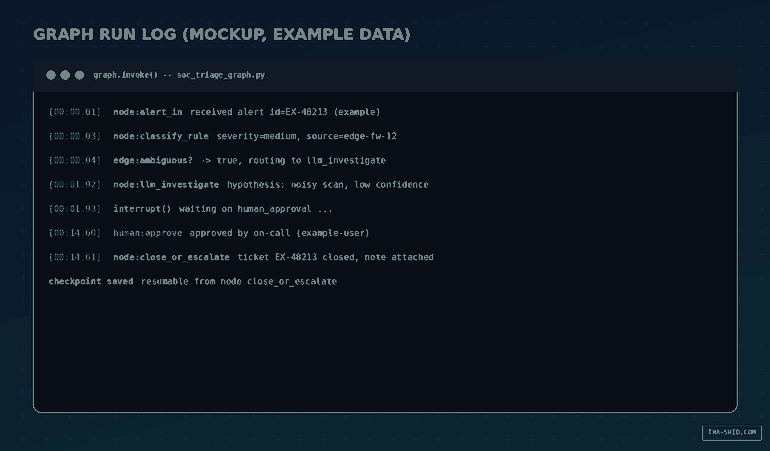
A deterministic node classifies severity by rule. Anything ambiguous routes to an LLM node that investigates and writes a hypothesis. Before the graph auto-closes anything, it hits an interrupt() and waits for a human to approve, edit, or reject. Nothing gets closed on a guess.
2. Automated incident postmortem drafts
One node pulls the timeline and logs for an incident. Another asks the model to draft a plain English postmortem from that timeline. A third node holds the draft for human review before it goes anywhere near a shared doc. Example prompt for the drafting node: "Summarize this incident timeline for a blameless postmortem. Flag any gaps in the timeline instead of guessing."
3. CI/CD release gate agent
A deterministic node checks test status and coverage deltas. If everything is green, the graph proceeds automatically. If something looks marginal, an LLM node reviews the diff and changelog for risk signals, then the graph interrupts before the deploy step so a human signs off. Command example for the risk review node: "Given this diff and the changed file list, flag anything that touches auth, billing, or migrations."
4. Security patch triage over MCP
Wire a CVE lookup tool through langchain-mcp-adapters, which converts any MCP server's tools into something a LangGraph node can call directly. If you already run MCP connectors for other tools, this is the same protocol, just called from your own graph instead of Claude. The agent pulls CVE details, scores priority, and drafts a ticket, then waits for approval before it actually files anything.
5. Long running log investigation with persistence
Fleet-wide log correlation can take hours, not seconds. Compile the graph with a checkpointer so it can pause between steps and resume exactly where it left off, even after a restart. Useful for anything that has to survive a deploy or a laptop closing mid investigation.
6. On call runbook executor
Model a runbook as a graph where some steps are deterministic tool calls (restart a service, check a health endpoint) and others ask the model to interpret ambiguous output ("is this log line actually the problem or noise"). Put an interrupt before any step that is destructive, like a service restart or a rollback, so a human always signs off before something irreversible happens.
7. Compliance evidence collector
Deterministic nodes gather evidence from your ticketing system, your IAM console exports, and your change logs. An LLM node turns that pile of evidence into the narrative summary an auditor actually wants to read. A human review node sits before the packet is marked final, since this is exactly the kind of document you do not want an agent shipping unsupervised.
Safety and Gotchas
interrupt() does nothing useful without a checkpointer wired up first. No persistence means the graph has nowhere to save its state while it waits, so the pause cannot actually happen. Start every workflow that touches production with a checkpointer, even a throwaway InMemorySaver while you are prototyping.
Speaking of which: InMemorySaver only lives in RAM. It disappears the moment your process restarts. Treat it as a development tool, not a production one. Swap in a Postgres or Redis backed checkpointer before you trust a graph with anything that needs to survive a deploy.
LangGraph's whole selling point is low level control, which also means it will not stop you from writing a graph that loops forever or an edge condition that never resolves. Set recursion limits and test your exit paths on purpose, don't assume they work.
The biggest one: any node that can take an irreversible action in the real world, closing a ticket, deploying code, deleting a resource, rotating a credential, should sit behind a human-in-the-loop interrupt until you have enough runs under your belt to trust it. Treat "irreversible" as the bar for whether a step needs a human, not "seems risky."

Usage and Cost Tips
The framework itself is open source and free, full stop. The bill you actually get comes from two places: the LLM calls your nodes make, and, if you turn it on, LangSmith for tracing and evaluation. LangSmith's Developer tier is free with 5,000 traces a month and 14 day retention, which covers most solo experimentation, and the Plus tier runs $39 per seat per month with a base trace allotment plus metered overage after that.
If you move to hosted deployment instead of self-hosting, LangGraph Platform has its own free Developer tier for a single assistant with limited runs, and a Plus tier starting around $35 a month for more assistants and concurrency.
Practical tip: build and test locally with an in-memory checkpointer and tracing off. Only flip on LangSmith tracing once you are actually debugging something real, chatty agents burn through trace quotas fast once every node call gets logged.
FAQ
Do I need LangChain to use LangGraph?
No. LangGraph is built by the same company and the docs lean on LangChain components for model and tool integrations, but LangGraph itself works standalone. You can plug in any model client you like.
Is LangGraph the same as CrewAI or the OpenAI Agents SDK?
No, and that is the point. CrewAI and the Agents SDK give you higher level, more opinionated abstractions for common agent patterns. LangGraph is intentionally lower level so you can hand-wire exactly where the model has authority and where it doesn't, at the cost of writing more of the plumbing yourself.
Can a LangGraph agent call my existing MCP tools?
Yes. The langchain-mcp-adapters library connects to any MCP server and converts its tools into something a LangGraph node can call natively, no manual wrapping required.
Get Building
Start small. Pick one workflow from this list, the one where a bad guess actually costs you something, and build the deterministic skeleton first. Add the LLM node second. Add the interrupt before you add anything that touches production. If you want structured practice turning workflows like these into something your team can actually run, our courses cover agent design patterns in more depth than a blog post can.