Claude Code turns your terminal into an agentic teammate that reads your repo, runs commands, and hands you a diff instead of a wall of chat.
See the workflow in action, tap through the tabs below:
curl -fsSL https://claude.ai/install.sh | bash
cd your-project
claude
claude "add rate limiting to the /api/login endpoint,
5 requests per minute per IP, return 429 with a
Retry-After header, and write tests"
git diff main --name-only | claude -p "review these
changed files for injection risks, hardcoded secrets,
and missing input validation"
Bypass mode isn’t a free pass. --dangerously-skip-permissions skips the interactive prompt, not a PreToolUse hook that denies a command, and it refuses to run as root or sudo on Linux and macOS.
Keep secrets out of CLAUDE.md. It’s a plain file that usually gets committed. Same goes for skill files.
Review the diff anyway. Fast isn’t the same as correct. Treat generated PRs like a teammate’s first draft.
What Claude Code Actually Is
Claude Code is Anthropic's agentic coding tool. It lives in your terminal (also in VS Code, JetBrains, a desktop app, and the browser), reads your entire codebase, edits files, runs shell commands, and works with git directly. It is not autocomplete. You describe a task in plain English and it plans the approach, touches multiple files, runs your tests, and shows you a diff to approve.
Every surface, terminal, IDE, desktop, and web, runs on the same engine. Your CLAUDE.md files, settings, and MCP servers carry over no matter where you start a session. For DevOps and security folks that matters: you can kick off a task from your phone, keep working in the terminal, and hand a long-running audit to a scheduled Routine without rebuilding context three times.
Quick Setup, About Five Minutes
Install it natively:
curl -fsSL https://claude.ai/install.sh | bash
On Windows PowerShell, use irm https://claude.ai/install.ps1 | iex instead. Homebrew (brew install --cask claude-code) and WinGet (winget install Anthropic.ClaudeCode) both work too, though neither auto-updates the way the native installer does.
Then point it at a project and go:
cd your-project
claude
First run asks you to log in with a Claude subscription, or approve an ANTHROPIC_API_KEY if you have one set. That's the whole setup. No config files required to start, though you'll want one soon.
The Mindset Shift: Teammate, Not Autocomplete
The biggest mistake new users make is treating Claude Code like a fancier tab-complete, hovering over every keystroke. Don't. Give it a real task, let it plan, and review the diff at the end instead of the process. That's where the leverage is.
Two habits pay off immediately. First, write a CLAUDE.md file in your project root with your coding standards, deploy commands, and review checklist. Claude reads it at the start of every session, so you stop repeating yourself. Second, let Claude build its own memory. It saves things like build commands and past debugging insights across sessions automatically, so week three is smoother than week one.
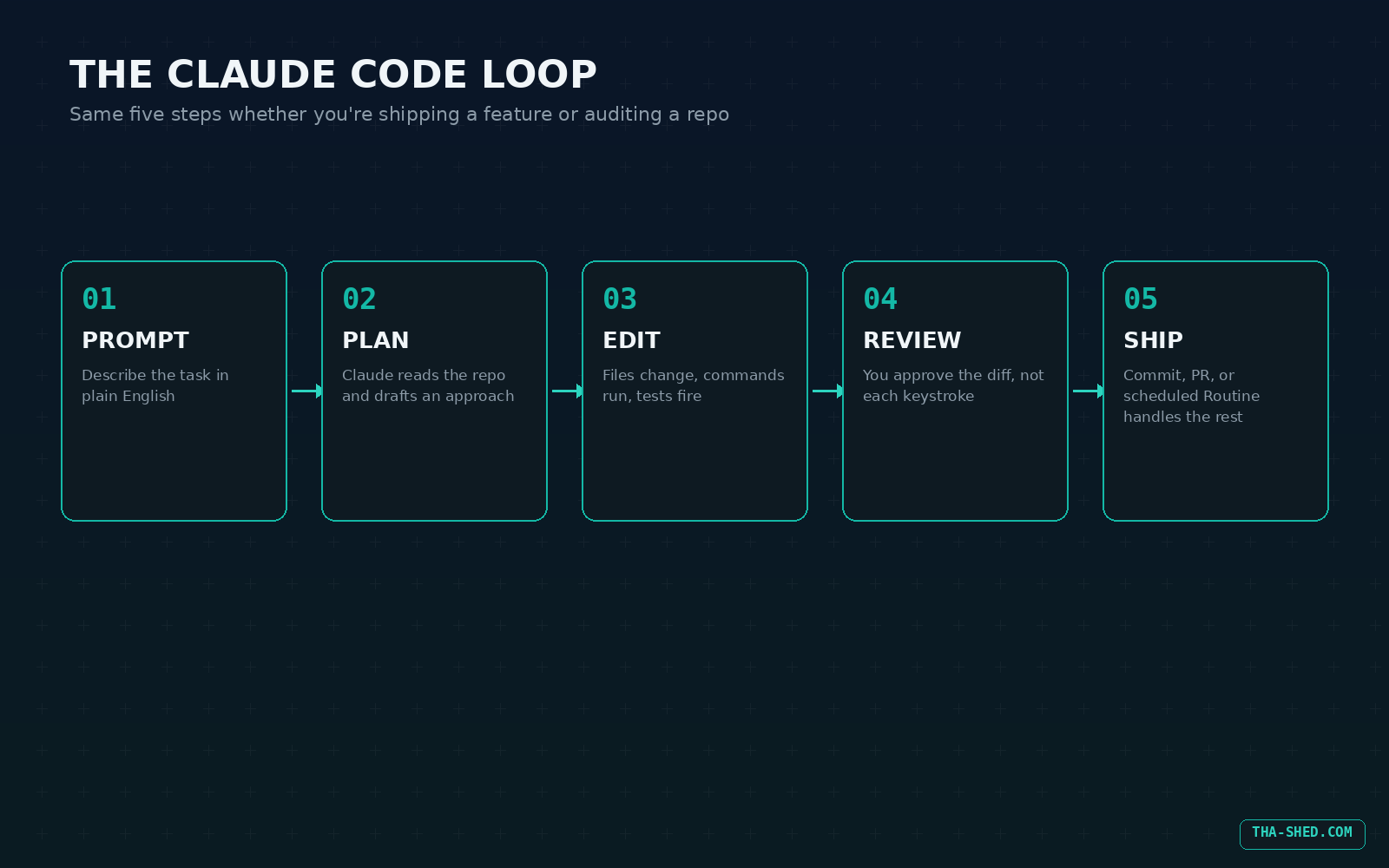
7 Workflows for DevOps and Security Teams
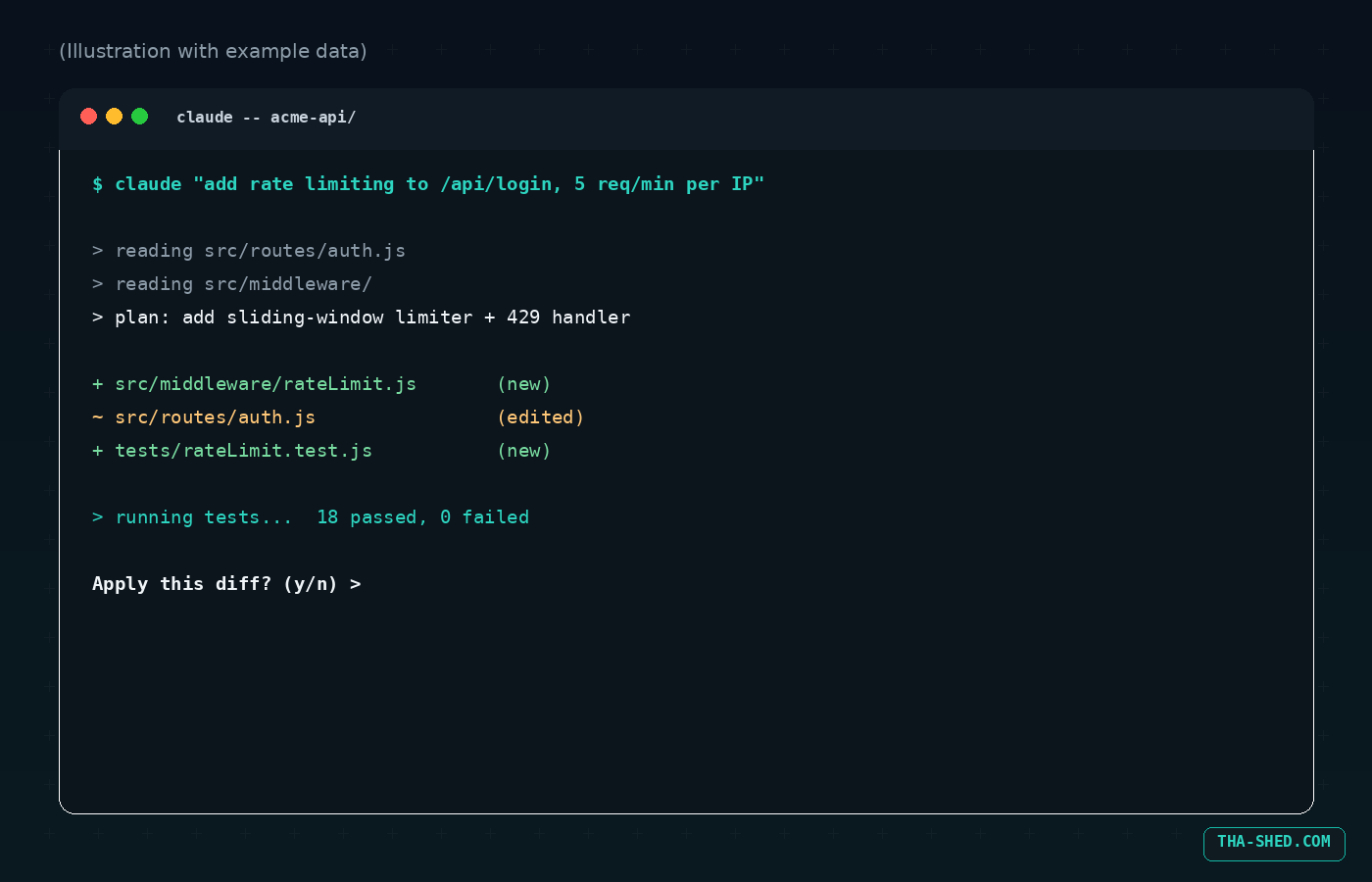
1. Ship a feature from a plain-English brief
Skip the ticket-to-code translation step. Describe the outcome and let Claude Code plan the implementation, touch the right files, and run the tests.
claude "add rate limiting to the /api/login endpoint, 5 requests per minute per IP, return 429 with a Retry-After header, and write tests"
2. Trace a broken pipeline from raw logs
Pipe failure output straight in. No screenshots, no copy-pasting stack traces into a chat window.
tail -200 ci.log | claude -p "diagnose why the deploy job failed and propose a fix"
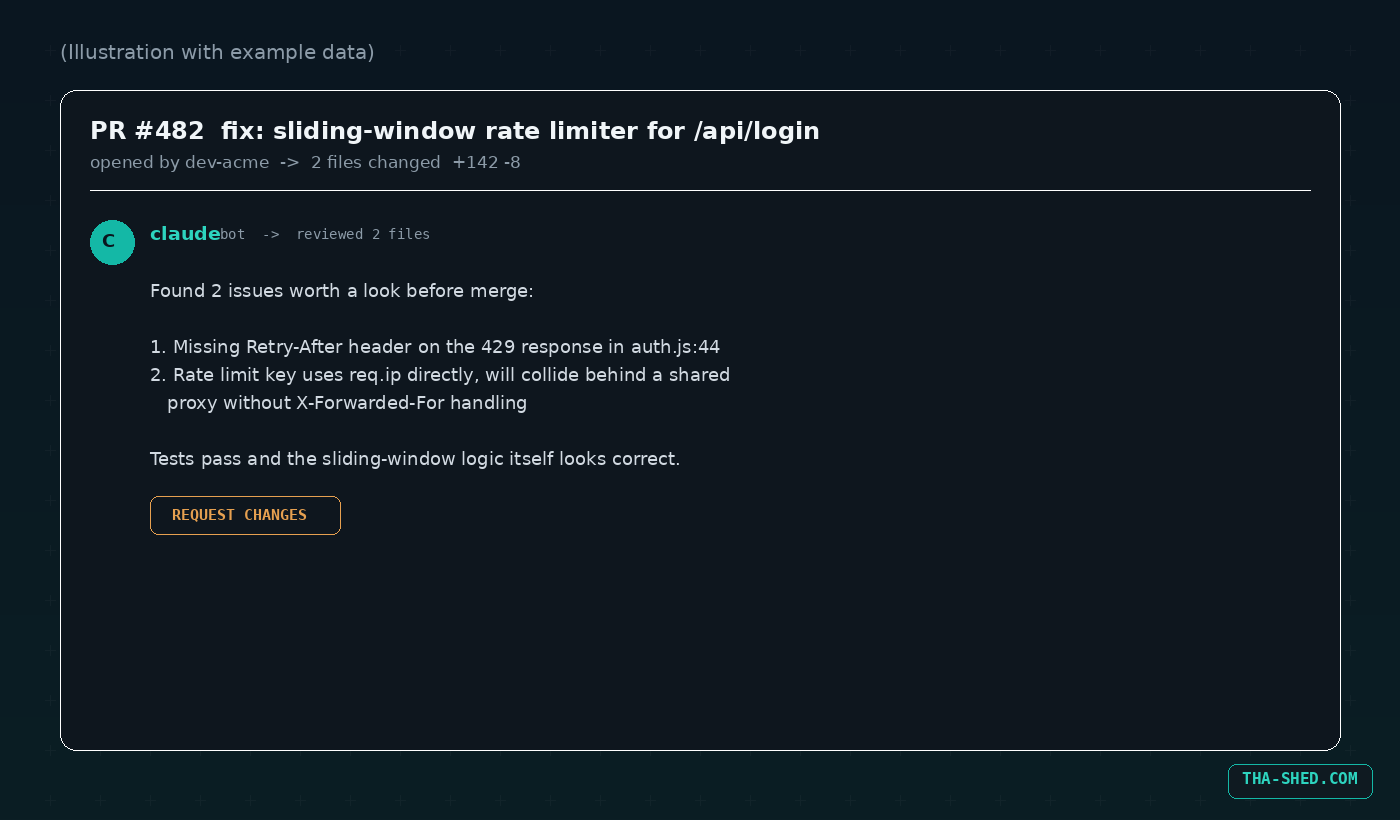
3. Automated PR review with GitHub Actions
Run /install-github-app once inside Claude Code to install the GitHub app and wire up the workflow file and secret. After that, tag @claude in any PR comment.
@claude review this diff for injection risks, missing error handling, and secrets committed by accident
4. Bulk security sweep across a diff
Before a release, run every changed file through a security-focused pass in one shot.
git diff main --name-only | claude -p "review these changed files for injection risks, hardcoded secrets, and missing input validation"
5. Pull context from Jira, Slack, or Drive with MCP
The Model Context Protocol connects Claude Code to the tools you already run tickets and docs through. Add a server, then reference it directly in a prompt: "pull the acceptance criteria from ticket OPS-482, implement it, and post a summary to the #releases Slack channel." No more tab-switching to copy requirements by hand.
6. Turn a one-off audit into a reusable Skill
Ran a useful sudoers audit or a dependency check once? Package it. Drop a SKILL.md into .claude/skills/security-audit/ and your whole team gets a consistent /security-audit command instead of everyone reinventing the same prompt.
7. Schedule recurring audits and run agents in parallel
Use /schedule (or Routines, which run on Anthropic's infrastructure even when your laptop is off) for the stuff that repeats: a nightly dependency audit, a morning PR review sweep, a weekly firewall rule drift check. For anything too big for one session, spawn multiple agents with /agents, a lead agent assigns subtasks and merges the results, which keeps your main conversation from drowning in exploration output.
Safety and Gotchas
The flag everyone eventually finds is --dangerously-skip-permissions. It skips the interactive approval prompt in front of every tool call, which is fast and also exactly as risky as it sounds. Two things worth knowing before you reach for it: it will not run with root or sudo privileges on Linux or macOS, full stop, and a PreToolUse hook that denies a command still blocks it regardless of permission mode. Bypass mode removes the human-in-the-loop step, not your safety rails, but you should still treat it as a last resort for trusted, sandboxed work only.
A few other habits worth keeping: never let CLAUDE.md or a skill file hold real credentials, since both tend to get committed to the repo. Scope any MCP server's API tokens to least privilege, Claude Code can act through that connection just as easily as you can. And even when a PR looks clean, review it like a human wrote it, because the moment you stop is the moment a subtly wrong regex slips into production.
Usage and Cost Tips
Claude Code rides on your existing Claude plan. It's included with Pro ($20/month, $17/month billed annually), Max 5x ($100/month), Max 20x ($200/month), Team, and Enterprise, and it shares the same usage budget as the Claude chat app and Cowork, it isn't a separate unlimited allowance. Anthropic doubled the five-hour rate limits for Pro, Max, Team, and seat-based Enterprise plans back in May 2026, so heavy CLI use is more forgiving than it used to be.
To stretch a session further, run /context to see how much of the context window you've used and /compact to trim it before it fills up. Pushing large exploratory tasks into subagents also helps, they do the digging in an isolated context and hand back a summary instead of filling your main conversation with every file they touched.
FAQ
Is Claude Code the same thing as the Claude chat app?
No. They share a subscription and usage budget, but Claude Code is a separate, terminal-native tool built for reading codebases, editing files, and running commands, not a chat window with syntax highlighting.
Can Claude Code push code without anyone reviewing it?
Not by default. It asks for approval before file edits and shell commands unless you explicitly turn on bypass mode, and even then a PreToolUse hook can still block a specific command. Keep human review in front of anything that merges to production.
Does it only work with GitHub?
No. GitHub Actions integration is the most common setup, but Claude Code also supports GitLab CI/CD for automated review and issue triage, plus Slack, Chrome, and a general Agent SDK if you want to build a fully custom integration.
Get Started
Install it, drop a CLAUDE.md in your messiest repo, and give it one real task today instead of a toy example. The gap between "neat demo" and "actual teammate" closes the moment you stop babysitting it and start reviewing diffs. If you want the broader picture of what else Claude can automate around your terminal work, our Claude Skills tutorial and Claude MCP Connectors tutorial are good next stops, and if you're building this out for a whole team, check our courses.