

A 20 MB Security log can hold minutes of history on a busy server. Query WMI from Ruby to find event logs that are too small, nearly full, or set to stop logging when full.
Step through the build below:
After an incident you need logs, and small default event logs roll over before anyone looks. Worse, a log with overwrite policy Never stops recording when full. This script uses Win32_NTEventlogFile via win32ole to check each log’s maximum size, current fill, and overwrite policy.
#!/usr/bin/env ruby
# frozen_string_literal: true
# win_eventlog_size_audit.rb - audit Windows Event Log size and retention via WMI
# (Win32_NTEventlogFile). Flags logs that are too small, nearly full, or set to
# never overwrite (which stops logging when full).
# Requires: Windows, Ruby 3.x (win32ole is bundled with RubyInstaller). Run elevated.
# Usage: ruby win_eventlog_size_audit.rb [--min-mb 64] [--full-pct 90]
require 'optparse'
MIN_MB_DEFAULT = 64
# Pure logic, kept separate from WMI so it can be unit-tested on any OS.
# entry: { name:, max_bytes:, file_bytes:, overwrite_policy:, overwrite_outdated: }
def evaluate(entry, min_mb:, full_pct:)
  issues = []
  max_mb = entry[:max_bytes] / 1_048_576.0
  pct = entry[:max_bytes].zero? ? 0 : entry[:file_bytes] * 100.0 / entry[:max_bytes]
  issues << format('max size %.0f MB < %d MB (history is lost quickly)', max_mb, min_mb) if max_mb < min_mb
  issues << format('%.0f%% full', pct) if pct >= full_pct
  # WMI: OverWritePolicy is "WhenNeeded", "OutDated" or "Never"
  issues << 'overwrite policy is Never: logging stops when the log fills' if entry[:overwrite_policy] == 'Never'
  { name: entry[:name], max_mb: max_mb.round, pct: pct.round(1), issues: issues }
end
def wmi_entries(computer)
  require 'win32ole'
  wmi = WIN32OLE.connect("winmgmts:\\\\#{computer}\\root\\cimv2")
  wmi.ExecQuery('SELECT * FROM Win32_NTEventlogFile').each.map do |f|
    { name: f.LogfileName, max_bytes: f.MaxFileSize.to_i, file_bytes: f.FileSize.to_i,
      overwrite_policy: f.OverWritePolicy.to_s }
  end
end
if $PROGRAM_NAME == __FILE__
  opts = { min_mb: MIN_MB_DEFAULT, full_pct: 90.0, computer: '.' }
  OptionParser.new do |o|
    o.on('--min-mb N', Integer) { |v| opts[:min_mb] = v }
    o.on('--full-pct N', Float) { |v| opts[:full_pct] = v }
    o.on('--computer NAME') { |v| opts[:computer] = v }
  end.parse!
  results = wmi_entries(opts[:computer]).map { |e| evaluate(e, min_mb: opts[:min_mb], full_pct: opts[:full_pct]) }
  puts format('%-22s %8s %7s  %s', 'LOG', 'MAX(MB)', 'FULL', 'STATUS')
  results.each do |r|
    puts format('%-22s %8d %6.1f%%  %s', r[:name], r[:max_mb], r[:pct], r[:issues].empty? ? 'OK' : r[:issues].join('; '))
  end
  exit(results.any? { |r| r[:issues].any? } ? 1 : 0)
end
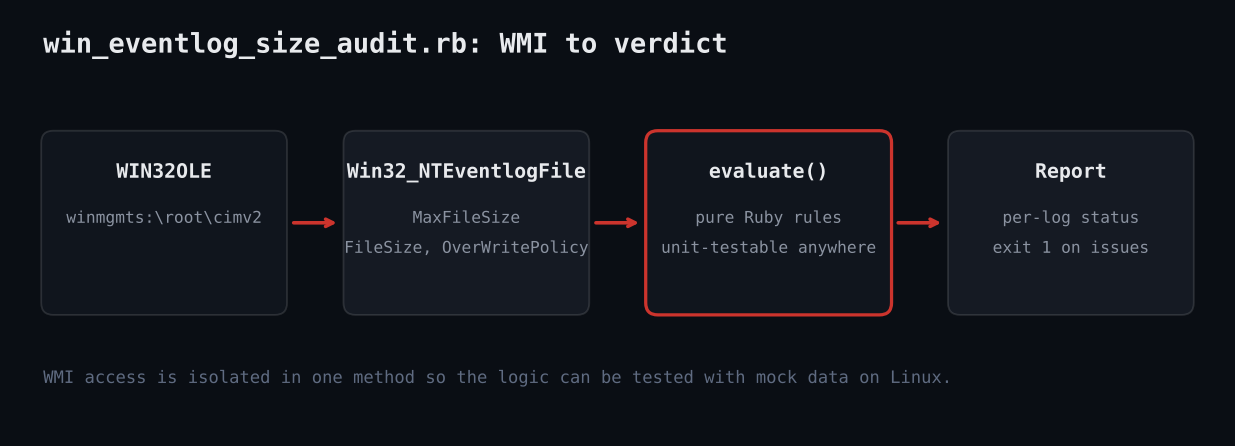
1. Connect to winmgmts with WIN32OLE. 2. Query Win32_NTEventlogFile and map each row to a plain hash. 3. evaluate() applies rules (min size, percent full, Never policy). 4. Print a per-log table and exit 1 on issues. 5. The rule logic is pure Ruby, so a mock harness tests it on any OS.
LOG                     MAX(MB)    FULL  STATUS
Security                     20   25.0%  max size 20 MB < 64 MB (history is lost quickly)
System                      128   93.8%  94% full
Application                 256    3.9%  overwrite policy is Never: logging stops when the log fills
Setup                       256    0.4%  OK
ALL ASSERTIONS PASSED
Full script + README on GitHub: ruby-devops-toolkit/win-eventlog-size-audit
Make sure the evidence exists
Event log capacity is a classic audit finding: the Security log defaults to 20 MB on many builds, which a domain controller can fill in minutes. Compliance frameworks usually expect much larger limits.
The design keeps WMI in one small method and the decision logic in a separate pure function. That separation is the key technique for testing Windows-only code from a Linux CI box.
- Windows 10/11 or Server 2016+
- Ruby 3.x from RubyInstaller (win32ole included)
- Elevated prompt, especially to read the Security log
- Optional:
--computer NAMEfor remote hosts with WMI/DCOM access
Complete code
#!/usr/bin/env ruby
# frozen_string_literal: true
# win_eventlog_size_audit.rb - audit Windows Event Log size and retention via WMI
# (Win32_NTEventlogFile). Flags logs that are too small, nearly full, or set to
# never overwrite (which stops logging when full).
# Requires: Windows, Ruby 3.x (win32ole is bundled with RubyInstaller). Run elevated.
# Usage: ruby win_eventlog_size_audit.rb [--min-mb 64] [--full-pct 90]
require 'optparse'
MIN_MB_DEFAULT = 64
# Pure logic, kept separate from WMI so it can be unit-tested on any OS.
# entry: { name:, max_bytes:, file_bytes:, overwrite_policy:, overwrite_outdated: }
def evaluate(entry, min_mb:, full_pct:)
  issues = []
  max_mb = entry[:max_bytes] / 1_048_576.0
  pct = entry[:max_bytes].zero? ? 0 : entry[:file_bytes] * 100.0 / entry[:max_bytes]
  issues << format('max size %.0f MB < %d MB (history is lost quickly)', max_mb, min_mb) if max_mb < min_mb
  issues << format('%.0f%% full', pct) if pct >= full_pct
  # WMI: OverWritePolicy is "WhenNeeded", "OutDated" or "Never"
  issues << 'overwrite policy is Never: logging stops when the log fills' if entry[:overwrite_policy] == 'Never'
  { name: entry[:name], max_mb: max_mb.round, pct: pct.round(1), issues: issues }
end
def wmi_entries(computer)
  require 'win32ole'
  wmi = WIN32OLE.connect("winmgmts:\\\\#{computer}\\root\\cimv2")
  wmi.ExecQuery('SELECT * FROM Win32_NTEventlogFile').each.map do |f|
    { name: f.LogfileName, max_bytes: f.MaxFileSize.to_i, file_bytes: f.FileSize.to_i,
      overwrite_policy: f.OverWritePolicy.to_s }
  end
end
if $PROGRAM_NAME == __FILE__
  opts = { min_mb: MIN_MB_DEFAULT, full_pct: 90.0, computer: '.' }
  OptionParser.new do |o|
    o.on('--min-mb N', Integer) { |v| opts[:min_mb] = v }
    o.on('--full-pct N', Float) { |v| opts[:full_pct] = v }
    o.on('--computer NAME') { |v| opts[:computer] = v }
  end.parse!
  results = wmi_entries(opts[:computer]).map { |e| evaluate(e, min_mb: opts[:min_mb], full_pct: opts[:full_pct]) }
  puts format('%-22s %8s %7s  %s', 'LOG', 'MAX(MB)', 'FULL', 'STATUS')
  results.each do |r|
    puts format('%-22s %8d %6.1f%%  %s', r[:name], r[:max_mb], r[:pct], r[:issues].empty? ? 'OK' : r[:issues].join('; '))
  end
  exit(results.any? { |r| r[:issues].any? } ? 1 : 0)
end
Step by step
Isolate WMI
wmi_entries connects with WIN32OLE.connect("winmgmts:...") and converts COM objects into plain hashes, so nothing else depends on Windows.
Define the rules
evaluate compares MaxFileSize in MB to --min-mb, computes FileSize/MaxFileSize as a percent, and checks OverWritePolicy for “Never”.
Guard the entry point
The $PROGRAM_NAME == __FILE__ check lets tests require the file without running WMI.
Print and exit
A fixed-width table shows each log with OK or the list of problems; exit code 1 signals findings to schedulers.
Test with a mock
The harness feeds four canned logs to evaluate and asserts which are flagged.
What you should see
LOG                     MAX(MB)    FULL  STATUS
Security                     20   25.0%  max size 20 MB < 64 MB (history is lost quickly)
System                      128   93.8%  94% full
Application                 256    3.9%  overwrite policy is Never: logging stops when the log fills
Setup                       256    0.4%  OK
ALL ASSERTIONS PASSED
- Honest note: win32ole/WMI cannot run on Linux, so only the evaluate() logic was executed in the sandbox with mock data; the WMI call follows documented Win32_NTEventlogFile properties but was not run live.
- Access denied: run elevated; Security log needs admin.
- Modern channels (Microsoft-Windows-*/Operational) are not in Win32_NTEventlogFile; use
wevtutil glfor those. - Increase size with
wevtutil sl Security /ms:536870912or GPO.
- Parse
wevtutil gloutput to cover operational channels. - Loop over a host list for fleet-wide reports.
- Export CSV for auditors.
- Alert when file size grows faster than expected.