GitHub Copilot’s coding agent now opens real pull requests while you’re in standup. Here’s how to actually run it for DevOps and security work, not just autocomplete.
See the workflow in action, tap through the tabs below:
$ terminal
npm install -g @github/copilot
copilot
> /login
$ github.com
Open the issue > Assignees > Copilot
Optional prompt: "Only touch src/payments,
keep the existing retry pattern, add tests"
$ copilot
> Explain CodeQL alert #58 and open
  an Autofix suggestion for it

  Reading reports/query_builder.py
  Parameterizing the query, opening PR
Autofix is best-effort. It won’t resolve every alert, and it can’t see runtime behavior, only the code and the scan data. Treat every suggested fix as a PR from a fast but junior teammate: read the diff, run the tests yourself, and don’t merge on faith. Same goes for coding agent PRs, they still need a human approval before any CI/CD workflow fires.
GitHub Copilot isn’t autocomplete anymore
If the last time you touched Copilot it was ghost text finishing your for-loops, you’re behind. In 2026 the product is really three tools wearing one name: inline completions and chat in your editor, a terminal-native CLI agent that can plan and execute multi-step work, and a cloud coding agent that picks up GitHub issues and opens pull requests on its own. Add Copilot Autofix, which turns CodeQL security alerts into ready-to-review patches, and you’ve got something that actually earns a spot in a DevOps or security workflow instead of just speeding up boilerplate.
The pitch for this crowd specifically: Copilot now runs inside GitHub Actions-backed sandboxes, respects your branch protections, and requires human approval before its pull requests can trigger CI/CD. That’s the difference between “AI toy” and “AI teammate you can actually give write access to.”
Quick setup
Three things to turn on, in order of how fast they pay off.
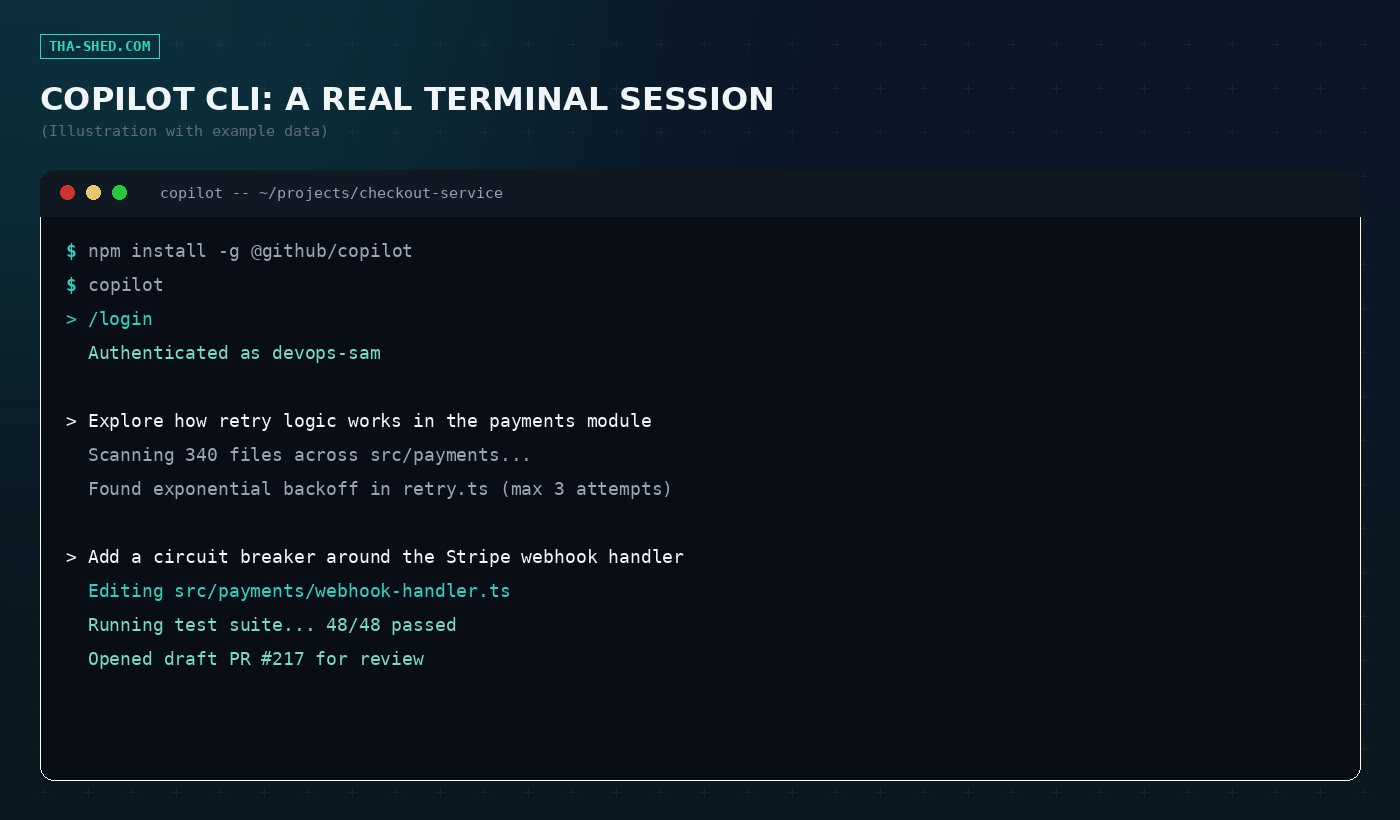
1. Copilot CLI. Requires Node.js 22 or later. Install it globally, launch it in a project directory, and authenticate:
npm install -g @github/copilot
copilot
> /login
It’s also available via Homebrew or WinGet if you’d rather skip npm. Every paid plan (Pro, Pro+, Business, Enterprise) includes it.
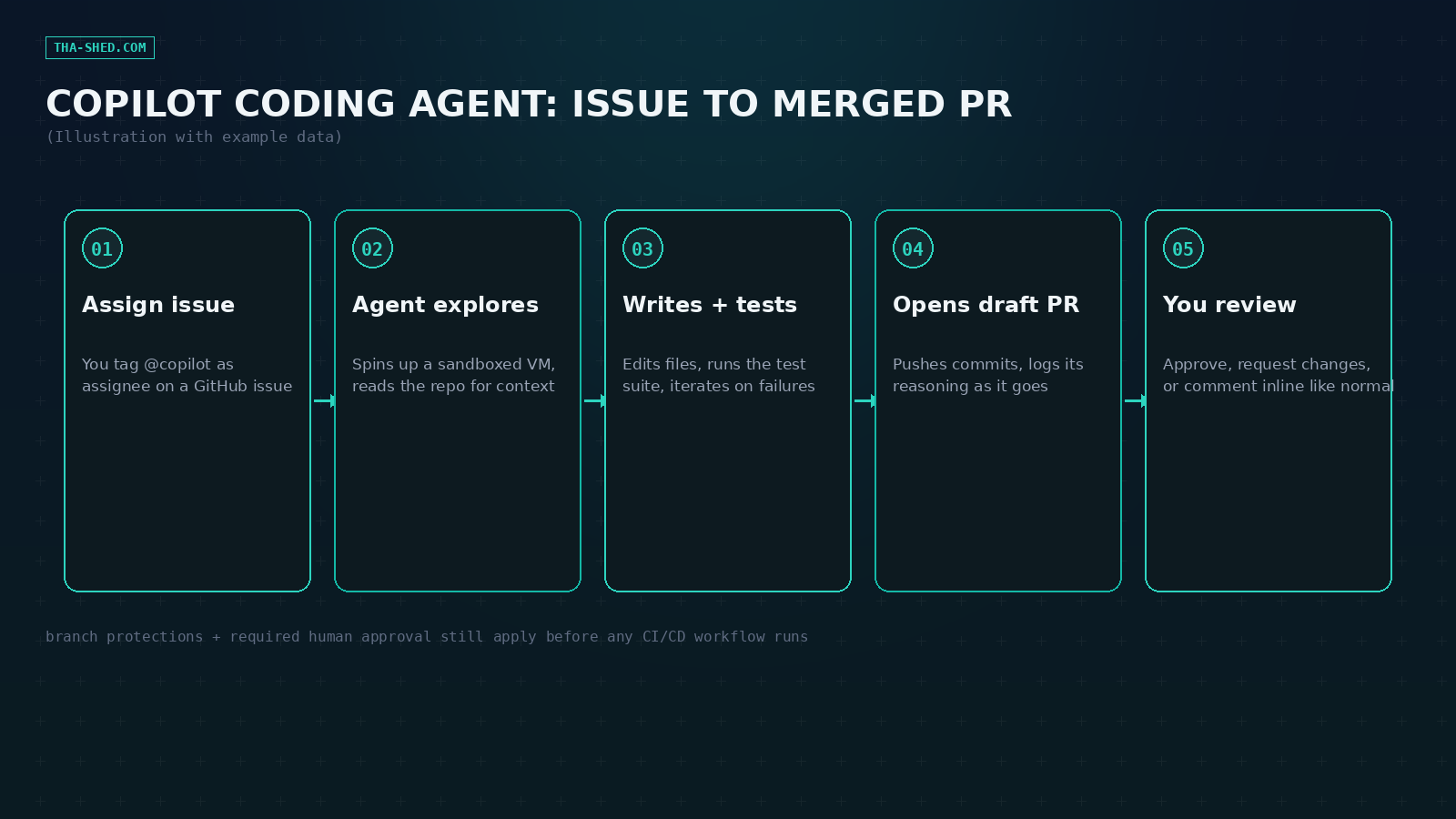
2. Coding agent (the cloud one). On any repo, open an issue, click Assignees, and pick Copilot. It spins up a GitHub Actions-powered sandbox, reads your repo for context, writes code, runs your tests, and opens a draft PR when it’s done. No extra install, it’s a permission you flip on for the repo or org.
3. Agent mode in your IDE. VS Code and the JetBrains family both ship an autonomous multi-step agent mode now, model picker included (GPT-5.1-Codex-Max, Claude Opus 4.5, Gemini 2.0 Flash, or Auto to let Copilot choose per task).
The mindset that actually matters
Stop treating Copilot like a search engine and start treating it like a fast, slightly overconfident junior engineer. It will happily write code that compiles and passes the tests you gave it while missing the constraint you didn’t write down. The workflows below all lean on the same principle: scope the task tightly, give it the guardrails (which files, which patterns, what not to touch), and always read the diff before you merge. The agent logging its reasoning as it works isn’t a nice-to-have, it’s your audit trail. Use it.
7 workflows worth stealing
1. Explore a repo you didn’t write. Point the CLI’s Explore agent at an unfamiliar service before you touch anything:
copilot
> Explore how retry logic works across the payments module and summarize the failure modes it already handles
2. Assign a bug to the coding agent and go do something else. On the GitHub issue: Assignees > Copilot, with a scoped prompt in the optional field. It opens a draft PR, you review it on your own time.
3. Add resilience code with a tight leash.
> Add a circuit breaker around the Stripe webhook handler. Only edit src/payments/webhook-handler.ts, keep the existing logging format, and add tests4. Turn a CodeQL alert into a patch with Autofix. Autofix doesn’t require a Copilot subscription at all, it’s part of GitHub Advanced Security. Open the alert, click “Generate fix,” and it produces a PR with the targeted change and an explanation.
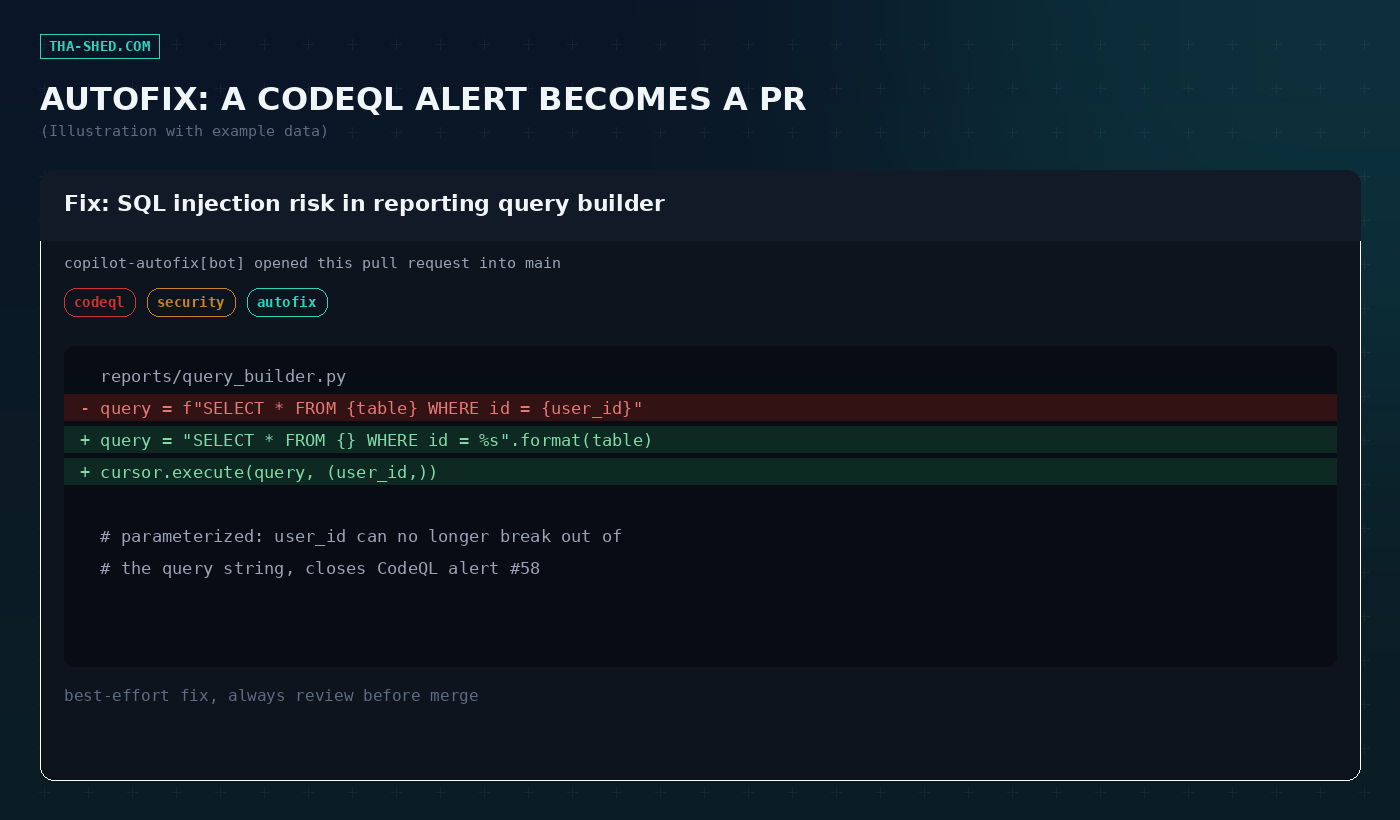
5. Get a second reviewer on every PR. Copilot’s PR review feature reads the diff and leaves inline comments the way a teammate would, catching missed null checks and inconsistent error handling before a human has to.
6. Delegate the test-writing, not just the feature. The CLI’s Task agent is built for exactly this: point it at a module and have it run and expand the test suite without cluttering your main planning context.
> Write integration tests for the new circuit breaker, covering the half-open state and a forced timeout7. Draft the Dockerfile or Terraform stanza first, refine second. Agent mode in your IDE is fast at getting infrastructure boilerplate to a reasonable starting point. Don’t ask it to design your VPC layout, ask it to implement the layout you already decided on.
Safety and gotchas
Autofix is explicitly best-effort, GitHub says so in their own docs, it will not resolve every alert and can produce a fix that’s technically correct but operationally wrong. Coding agent PRs run inside a sandboxed environment and can’t trigger your CI/CD without a human clicking approve first, but that approval means something only if you actually read the diff. Don’t hand the coding agent write access to a repo with secrets baked into config files and no branch protection, that’s a self-inflicted wound, not an AI problem. And keep an eye on what context the agent pulls in: if your repo has a monorepo with unrelated services, scope its exploration or you’ll get changes that “fix” the wrong thing confidently.
Usage and cost tips
As of June 2026, Copilot billing runs on AI Credits, priced per token and converted at $0.01 per credit, so bigger tasks with more back-and-forth cost more than a one-line completion. Copilot Pro ($10/month) and Pro+ ($39/month) are the individual tiers most engineers want, Business ($19/user/month) and Enterprise ($39/user/month) pool credits at the org level. Code completions themselves are free on every paid plan, it’s the agentic, multi-step work (coding agent, heavy CLI sessions) that draws down credits fastest. If you’re testing the coding agent for the first time, start it on a small, well-scoped issue, not your gnarliest legacy bug, so you’re not burning credits on an agent that has to re-explore a huge codebase from scratch.
FAQ
Does the coding agent need admin access to my repo?
No. It works through normal GitHub permissions and PR review, same as a human contributor, and your existing branch protections still apply.
Can Autofix introduce new bugs?
Yes, it’s model-generated code operating on a best-effort basis. Review every suggested fix like you would any other PR, don’t auto-merge.
Is Copilot CLI the same as agent mode in VS Code?
They share the same underlying agent capabilities (Plan mode, Autopilot, specialized sub-agents) but the CLI is terminal-native, useful for headless or remote-server work where you don’t have an IDE open.
Where to go from here
Start with one workflow, not all seven. Assigning a single well-scoped issue to the coding agent this week will teach you more about where it’s trustworthy than reading another roundup will. If you’re comparing it against other AI-native editors, our Cursor tutorial covers the same ground from a different angle. And if you want structured, hands-on reps with agentic tooling instead of picking it up piecemeal, check out our courses.