Cursor turns your editor into a workspace where parallel AI agents draft, test, and review code, with a human holding the approval button. Here is how to wire it for real DevOps and security work.
Cursor wires Claude, GPT, and Gemini directly into a VS Code fork instead of bolting an assistant on top, and its Agents panel turns one editor into a small workspace of parallel collaborators. Setup, 7 DevOps and security workflows, pricing, and the gotchas nobody mentions.
See the workflow in action, tap through the tabs below:
curl https://cursor.com/install -fsS | bash
agent --version
agent
---
description: Security conventions for API routes
globs: ["src/api/**/*.ts"]
alwaysApply: false
---

Never log auth tokens or secret values.
All new routes require input validation
and rate limiting before merge.
Flag any raw SQL string concatenation.
{
  "mcpServers": {
    "example-tickets": {
      "command": "npx",
      "args": ["-y", "example-mcp-server"]
    }
  }
}
Credit surprises. Auto mode is unlimited on every paid plan. Manually picking a frontier model like Opus or Sonnet is what drains your credit pool, and doing it by default is the fastest way to a mid-month overage.
Too many writing agents. Cap yourself at two agents with write access running at once. Read-only research and review agents can run alongside them on cheaper, longer-context models.
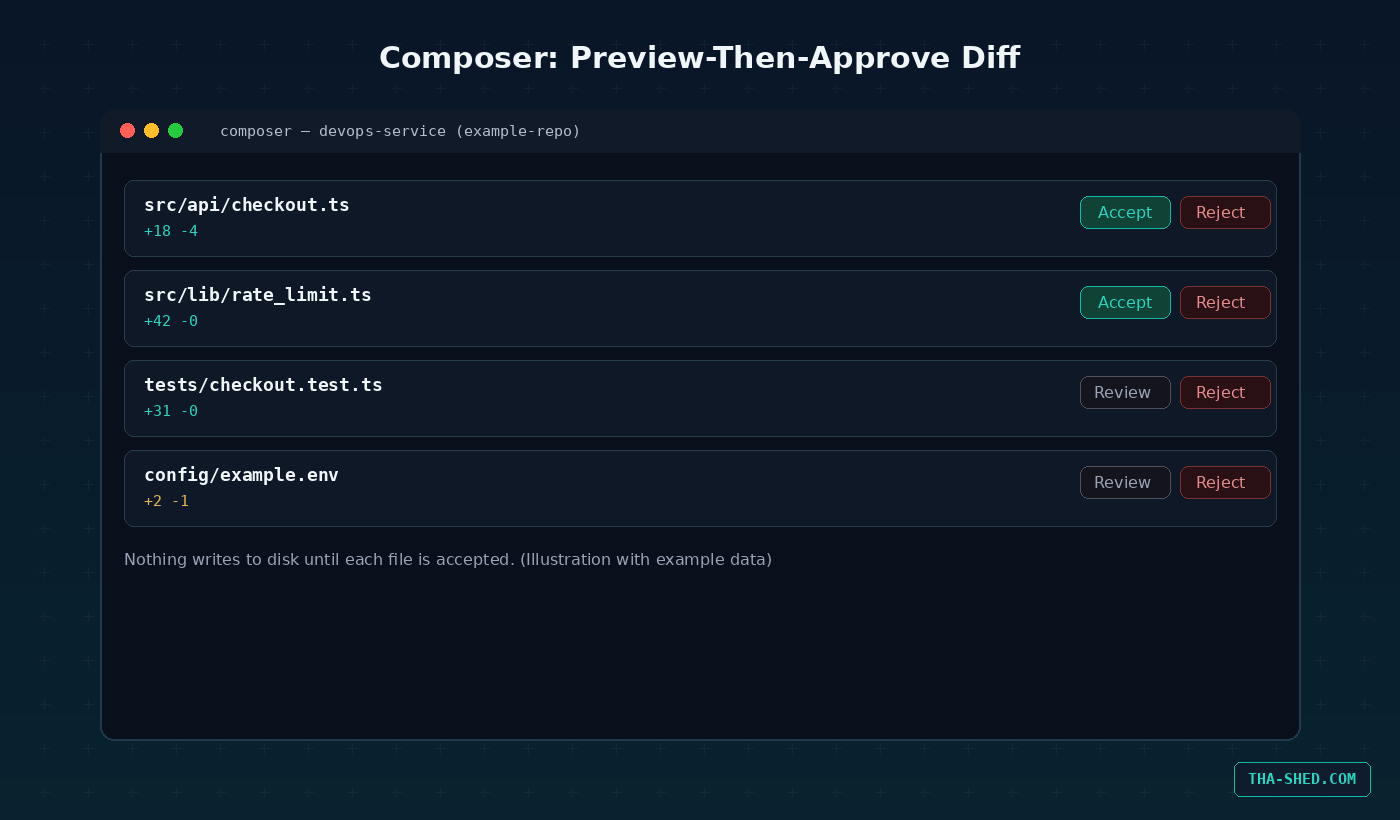
Auto-apply left on. Composer’s legacy auto-apply flow writes files immediately with no per-file review. Keep preview-then-approve as the workspace default on anything a teammate will see.
What Cursor actually is
Cursor is an AI-native code editor built on a VS Code fork by a company called Anysphere. Instead of bolting an assistant onto an existing editor, Cursor rebuilds the whole loop around three surfaces: Tab, which predicts your next edit as you type, Composer, which handles multi-file changes and terminal commands with a reviewable diff, and Agents, a panel that runs several agents in parallel, each with its own model, working set, and approval policy. Cloud Agents extend the same idea to remote machines when a job outgrows your laptop.
By early 2026 Anysphere had crossed $2 billion in annualized revenue with more than a million paying subscribers, and Cursor is reportedly running inside 64 percent of Fortune 500 companies. That is not hobbyist adoption. For a DevOps or security team specifically, the pitch is narrower than “AI writes code faster.” It is that a job like “audit this service, patch the vulnerability, write the tests, and review the diff” can be split across separate agents instead of asking one chat window to do all four badly in sequence.
Where Cursor sits next to a tool like Claude Code matters too. Claude Code runs headless in a terminal with up to a million tokens of context, well suited to long CI jobs and deep filesystem work. Cursor gives you a full visual IDE instead: inline diffs, multi-file previews, and a model router that switches between Claude, GPT, and Gemini per task. Most teams running both route terminal-first and CI work to Claude Code and editor-centric, visual, multi-agent work to Cursor.
Quick setup
Download Cursor from cursor.com for macOS, Windows, or Linux and sign in. New accounts land on the free Hobby tier, plus a one-week Pro trial. Hobby is fine for kicking the tires, it is not enough to finish a real feature before you hit a wall. For headless work, background jobs, or wiring Cursor into CI, install the CLI shown in the setup tab above and authenticate it separately from the desktop app.
Before you lean on agents for anything that touches a shared codebase, spend the first ten minutes writing a rules file and wiring up at least one MCP server. Both take a few minutes and save you from an agent guessing at conventions you already had written down somewhere in a wiki nobody reads.
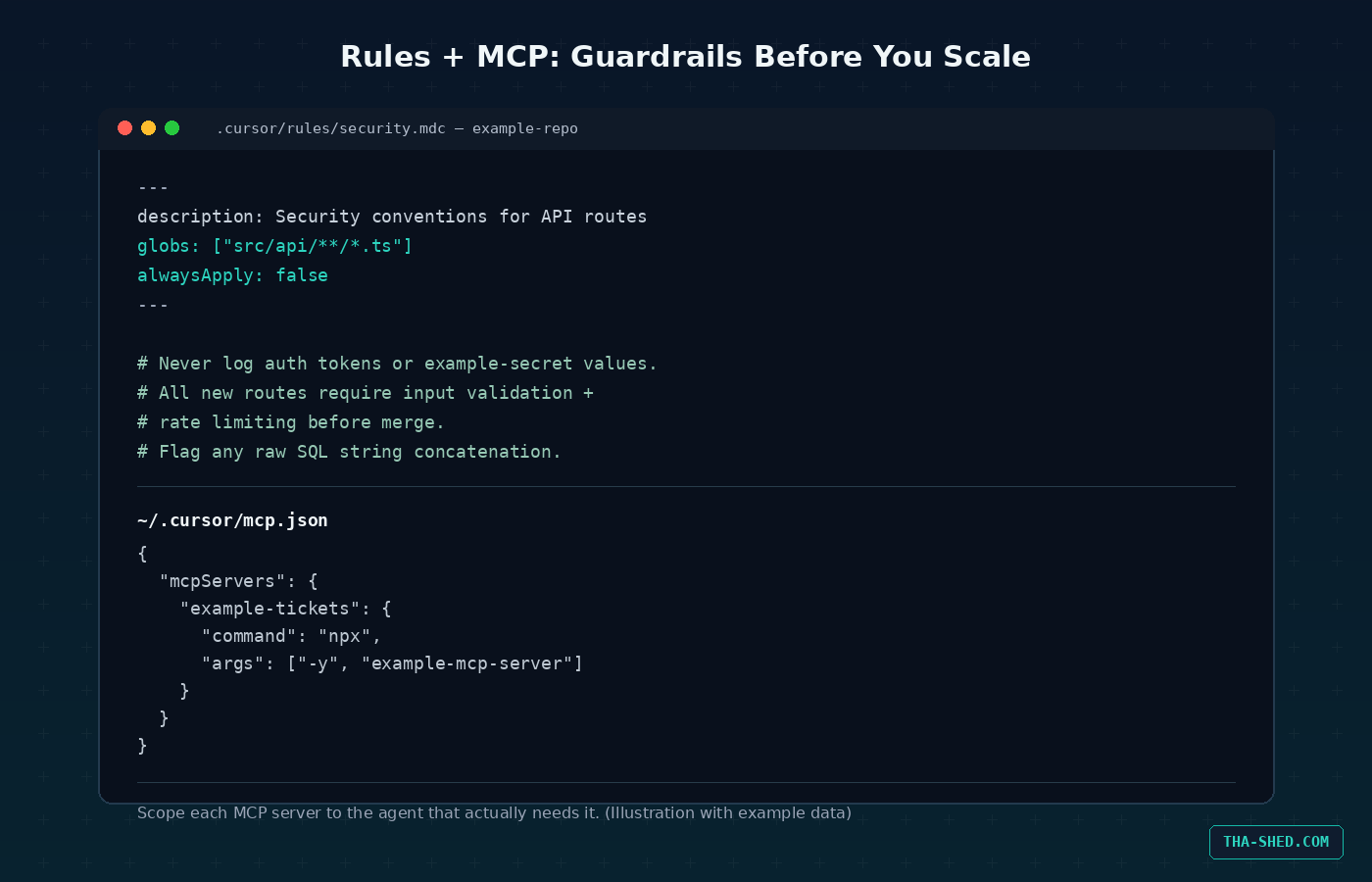
(Illustration with example data)
The mindset: a workspace, not a chatbox
The biggest shift in how to use Cursor in 2026 is realizing it stopped being an assistant living inside your editor and started being a workspace where multiple agents and one human collaborate on the same project. Composer used to write every file it touched and let you clean up afterward. The current default is preview-then-approve: every multi-file edit stages as one reviewable diff with per-file accept or reject, and nothing writes to disk until you say so. Leave it that way. The legacy auto-apply flow still exists in settings for solo scratch projects, but it has no place on a codebase a second engineer will ever open.
The second habit mirrors what makes role-based agent frameworks work elsewhere: give each agent one job and the narrowest scope that lets it do that job. A research agent gets read-only access and writes findings to a docs folder. A build agent gets write access to src and nothing else. A review agent stays read-only and produces comments, not commits. Four agents on one over-privileged config is not a productivity win, it is an expensive way to discover what “blast radius” means.
7 workflows worth building
1. Tab and Cmd+K for the boring 80 percent
Tab handles multi-line predictive completion as you type, and inline edit, Cmd+K on Mac or Ctrl+K on Windows and Linux, handles a surgical single-file change without opening a full chat. Select a function, hit Cmd+K, and type something like “add input validation and a rate limit check to this handler.” Most of a session’s keystrokes disappear here, and it needs the least review scrutiny since it stays scoped to the file already open.
2. Composer for reviewable multi-file refactors
For anything touching more than one file, Composer stages a single diff across the whole change set. Example prompt: “Extract the retry logic in these three services into a shared utility, update all call sites, and add a test for the new module.” Walk the diff file by file, accept what is correct, reject what is not, and nothing lands until you have looked at it.
3. The Agents panel as a mini pipeline
Spawn a research agent to audit a service and write a plan to docs, a build agent to implement that plan against Composer, a test agent scoped to your spec directory, and a review agent that only reads and comments. Keep no more than two writing agents active at once. Reasoning-heavy jobs like review and research are a good fit for a longer-context model, fast iterative jobs like tests are a good fit for a quicker one.
4. Rules to bake in conventions and guardrails
A rules file living in .cursor/rules uses Markdown with a small YAML frontmatter block: a description, a globs pattern scoping which files it applies to, and an alwaysApply flag. Write a security rule scoped to your API routes that says never log auth tokens, always validate input, always rate limit, and flag raw SQL concatenation, and every agent touching those files inherits that constraint without you repeating it in every prompt.
5. MCP to wire in the tools you actually use
Model Context Protocol servers let an agent reach your real internal tooling instead of guessing. Add a server to .cursor/mcp.json, project scoped, or the equivalent file in your home directory, global, and the Composer agent picks up the relevant tool automatically when a task calls for it. Cursor scopes MCP servers per agent, so your build agent can reach your ticketing system while your review agent stays read-only against production data. Keep an eye on Cursor’s 40-tool ceiling per agent, past that, only the first 40 get sent.
6. Design-driven Composer for internal admin UI
Drop a screenshot or a Figma export into Composer, describe the target framework and component library, and it scaffolds a first pass of the component. It is genuinely useful for getting an internal dashboard or admin panel from nothing to roughly 70 percent done in a couple of minutes. Treat the last third, spacing polish, focus states, accessibility, as a human pass, not something to keep re-prompting for.
7. Background and Cloud Agents for the job you do not want to babysit
Kick off a repo-wide dependency audit or a long-running migration as a Background or Cloud Agent and keep working while it runs, checking in on the diff when it is ready instead of watching a spinner. This is the natural home for the kind of overnight or CI-adjacent job that used to require a dedicated script and a cron entry.
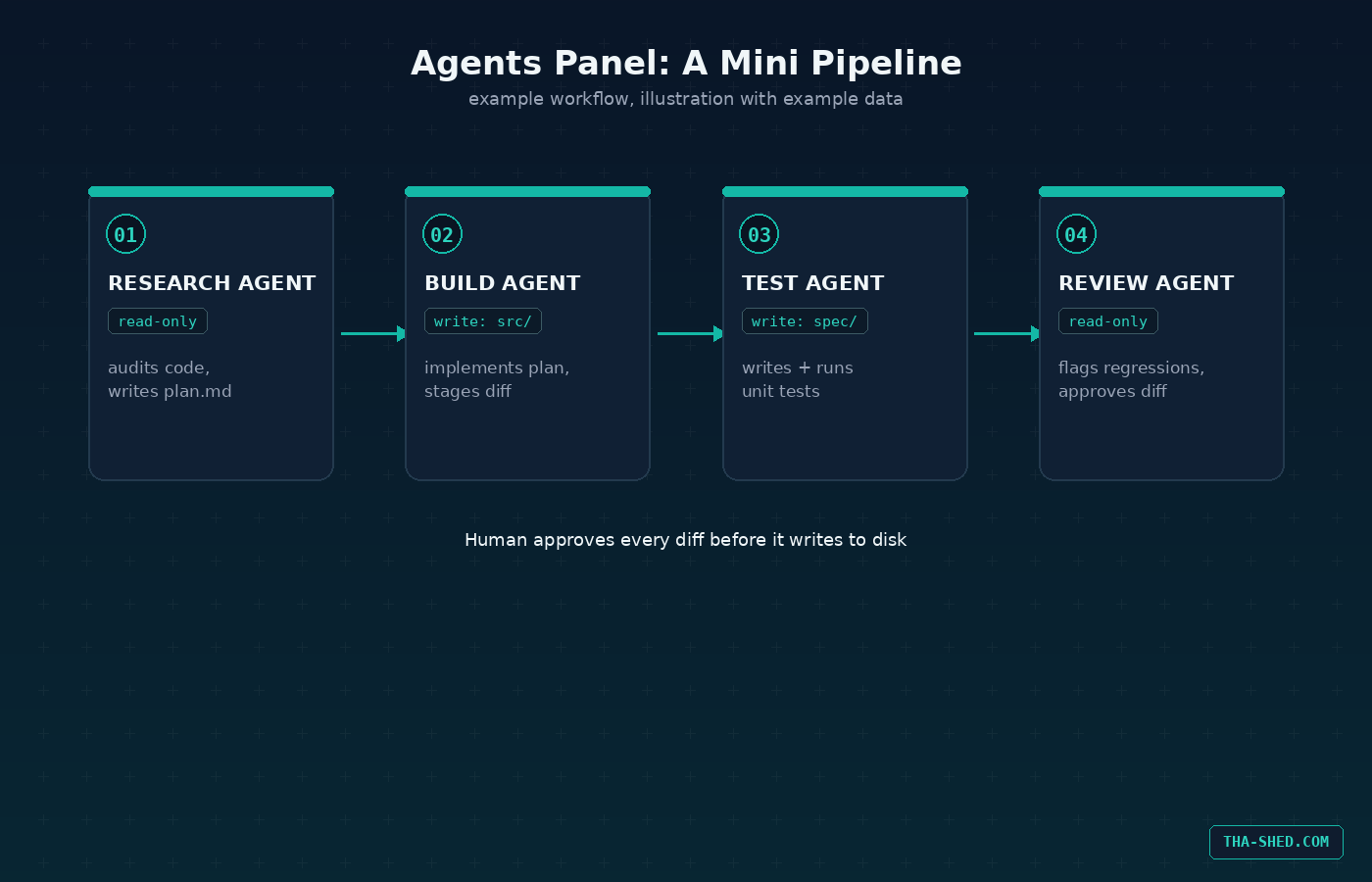
(Illustration with example data)
Safety and gotchas
Keep Composer on preview-then-approve, not auto-apply, on anything a teammate will see. Cap yourself at two writing agents running at once, more than that and token burn spikes while your ability to actually review each diff does not scale with it. Scope every MCP server to the one agent that needs it rather than exposing it workspace-wide, and remember the 40-tool limit per agent when you start stacking servers. And do not treat design-driven Composer output as production-ready, the first pass is a starting point for a designer-developer conversation, not a page generator.
Cost and usage tips
Cursor runs six tiers: Hobby is free for evaluation only, Pro is $20 a month with a $20 monthly credit pool, Pro+ is $60 a month for three times the usage, Ultra is $200 a month for twenty times the usage, Teams runs $40 per seat a month, and Enterprise is custom with pooled usage across the org. Since mid-2025 those credits are consumed only when you manually pick a frontier model like Opus or Sonnet, Auto mode, where Cursor picks the model for you, is unlimited on every paid plan and does not touch your pool. Stay in Auto for routine work, save manual model selection for the tasks that genuinely need frontier reasoning, and check your usage dashboard weekly rather than waiting for a surprise at the end of the month. Published prices and tiers shift, so check cursor.com directly before you commit a team budget to a specific number.
(Illustration with example data)
FAQ
Is Cursor free to use?
The Hobby tier is free indefinitely with limited Tab completions and Agent requests, plus a one-week Pro trial for new accounts. It is enough to evaluate the tool. It is not enough to carry a real feature through to done.
Cursor or Claude Code for a DevOps and security team?
Both, most likely. Cursor wins for editor-centric work: visual diffs, multi-agent orchestration in one UI, design-driven scaffolding. Claude Code wins for terminal-first and headless work: long CI jobs, deep filesystem operations, hook-driven automation. Teams running both usually share MCP servers and a model-routing policy across the two rather than picking a single winner.
How do I stop Composer from writing files I have not reviewed?
Make sure preview-then-approve is your workspace default, not the legacy auto-apply setting. Every multi-file edit will then stage as one reviewable diff with per-file accept or reject, and nothing touches disk until you approve it.
Closing
Cursor’s bet is that AI-assisted development stops looking like a chat window and starts looking like a workspace: multiple agents, explicit approval gates, and a model router that matches the tool to the job instead of defaulting to whatever is loudest. If you are stacking tools, see how it complements a role-based framework like CrewAI or an orchestration layer like n8n before you commit a production workflow to any single one of them. And if you want a structured path through building and shipping these systems instead of piecing it together from docs at 11pm, check out our courses.