Drag-and-drop AI agents that triage alerts, gate risky actions behind human approval, and plug straight into your MCP tools. No LangChain boilerplate required.
See the workflow in action, tap through the tabs below:
npm install -g flowise
npx flowise start
# opens at http://localhost:3000
Supervisor Agent -> Messages -> System

You triage incoming alerts for a platform team.
Given an alert payload, decide severity, delegate
log lookup and infra checks to the Worker agents,
then write a one paragraph summary. Never restart
a service yourself. Always route through the
Human Input node first.
Agent node -> Tools -> Custom MCP Tool

MCP Server Name: github-mcp (example)
Command: npx -y @modelcontextprotocol/server-github
Env: GITHUB_TOKEN=your_token_here
Enable: Require Human Input for write actions
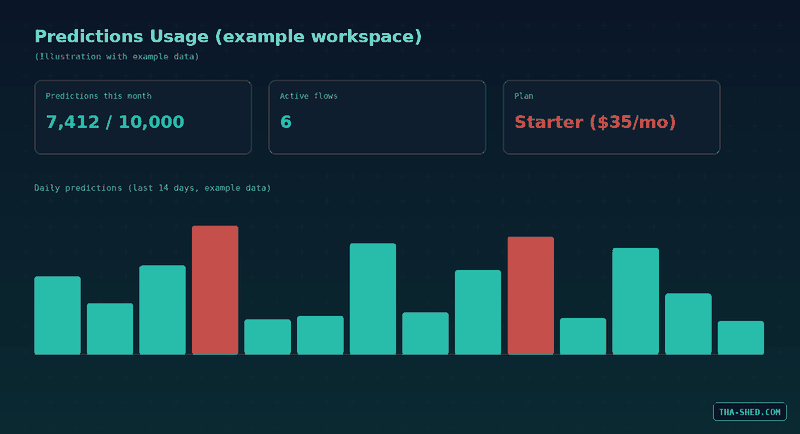
Watch these four. Docker’s default SQLite database gets wiped on restart unless you mount a volume. Predictions are metered per month, a busy internal chatbot can burn through 10,000 in two weeks. Give agents the minimum tools they need, not broad access. And keep the Flowise instance itself behind real authentication, never exposed openly on the public internet.
What Flowise Actually Is
Flowise is an open source, drag and drop platform for building AI agents and LLM workflows. Instead of hand rolling LangChain boilerplate, you wire nodes together on a canvas: a document loader here, a vector store there, an agent that decides which tool to call next. It ships three builder types. Assistant is the training wheels version, good for a chat helper that uses tools and reads uploaded files. Chatflow is the classic single pipeline builder: question in, retrieval, model call, answer out. Agentflow is the one worth your time, a superset of the other two that handles multi agent systems, supervisor and worker patterns, human approval gates, and full workflow orchestration.
For a DevOps or security team that distinction matters. You are not just building a chatbot. You are building something that can read a log query, decide whether an alert is real, and ask a human before it touches production.
Quick Setup
Local install takes about five minutes. You need Node 18.15 or newer, or Node 20. Run npm install -g flowise, then npx flowise start, and it opens at localhost:3000 with the canvas ready to go, straight from the official getting started guide. That is fine for kicking the tires. For anything you would trust with real credentials, self-host it properly: clone the Flowise repo, copy docker/.env.example to .env in the docker folder, and run docker compose up -d. That is the version you want for air-gapped or sensitive environments.
The Mindset: Nodes, Not Prompts
This is the part people skip. Coming from ChatGPT or Claude, the instinct is to write one giant prompt and hope the model sorts out the rest. Flowise punishes that instinct, on purpose. The value of the tool is decomposition. Break "triage this alert" into a Start node that captures the payload, a Supervisor Agent that reads it, Worker agents that go fetch specific data, a Condition node that makes the deterministic call an LLM should never be trusted to make alone, and a Human Input node before anything destructive happens.
Treat the LLM as the reasoning layer and everything else, retrieval, branching, memory, as plumbing you control explicitly. The Flow State, $flow.state, is how data moves between nodes that are not directly connected on the canvas. Declare your keys in the Start node before you build anything else. Operational nodes can update them but not create new ones.

6 Workflows Worth Stealing
1. RAG chatbot over your runbooks
Document Loader pointed at your markdown runbooks, a Text Splitter, a Vector Store, whatever you already run, a Retriever, then a Conversational Agent with memory. That is the whole pipeline. A working "ask the runbooks" bot in about 20 minutes with zero prior AI experience, according to Flowise's own numbers, and it is a fair estimate.

2. Multi-agent incident triage
Agentflow V2 with a Supervisor Agent that reads an incoming alert and delegates. One Worker Agent pulls logs through an MCP tool, another checks infrastructure state through an HTTP node. Each worker reports back to the Supervisor, which reasons over both results, sets severity, and writes the summary. This is the pattern that actually justifies calling something an "agent" instead of a chatbot with extra steps.
3. Human-in-the-loop remediation gate
Put a Human Input node in front of any Tool node that can actually do something: restart a service, roll back a deploy, revoke a key. Flowise also lets you flag individual tools inside an Agent node with a "Require Human Input" setting, so the agent has to stop and ask before it fires that specific tool, not just at the end of the flow.
4. Wire in MCP tools instead of building custom nodes
Add a Custom MCP Tool node to an Agent and point it at your GitHub, Jira, or internal MCP server. Flowise treats MCP as a first class integration, not a bolt-on, which means you are not maintaining a bespoke wrapper for every API your team already has an MCP server for. We wrote about the tool-calling side of this in Automated Custom Actions: Agent Tool Calling if you want more detail there.
5. Automated CVE watch
An HTTP node polling a security advisory feed, a Condition node filtering by severity, an LLM node writing a plain-English summary, a Direct Reply posting into your alerting channel. None of that needs an agent making autonomous decisions, and that is the point: use the Agent node when you need reasoning, use deterministic nodes when you do not.
6. Ship it as a widget or an API
Once a flow works, deploy it as an embeddable chat widget for an internal support page, or call it as a REST API from your own tooling. Same flow, two delivery mechanisms, no rebuild required.
Gotchas Nobody Puts In The Marketing Deck
- SQLite is the default database inside the Docker container. Restart the container without mounting a volume and every flow you built is gone.
- Self-hosting means you own patching, backups, and uptime. If that is not a job you want, pay for the cloud tier instead.
- Predictions metering catches people off guard. Ten thousand a month sounds generous until a moderately busy internal chatbot burns through it in two weeks.
- Give agents the minimum tools they need. An Agent node with broad tool access and no Human Input gate is exactly how "helpful assistant" turns into "thing that restarted the wrong service."
- Do not drop production API keys straight into Flowise credentials without checking your org's secrets policy first. Keep the instance itself behind real authentication too, not sitting open on the public internet.
What It Actually Costs
- Free: 2 flows and assistants, 100 predictions a month, 5MB storage. Fine for a proof of concept and nothing more.
- Starter: $35 a month, unlimited flows and assistants, 10,000 predictions a month.
- Pro: $65 a month, 50,000 predictions a month, unlimited workspaces, admin roles and permissions.
- Self-hosted: no license fee at all, every feature included, but you own the ops overhead.
None of those tiers include model or vector store costs. Whatever you point Flowise at, OpenAI, Anthropic, Pinecone, gets billed separately by that provider.
FAQ
Is Flowise the same as LangChain?
No. LangChain is a code library you import and write Python or JavaScript against. Flowise is a visual builder that uses LangChain and other frameworks under the hood for a lot of its nodes. If your team wants to move fast without maintaining custom orchestration code, Flowise is the better starting point. If you need something a node cannot express, drop into a Custom Function node and write real JavaScript.
Can Flowise replace n8n for our automation?
Not entirely, and you probably do not want it to. n8n is built for connecting hundreds of business apps with minimal AI reasoning involved. Flowise is built for AI reasoning first: agent to agent delegation, shared conversation state, and MCP tools as first class citizens. Plenty of teams run both, n8n for the plumbing between systems, Flowise for the parts that need an LLM actually deciding something. We cover the n8n side in our n8n for DevOps and security tutorial if you want the comparison.
Is Flowise safe to point at sensitive infrastructure data?
It can be, with the right setup. Self-host it inside your own network instead of using the cloud version, put real authentication in front of the instance, and gate every action-taking tool behind a Human Input node so nothing destructive fires without a person confirming it. None of that is automatic. It is on you to configure it that way.
Start Small, Then Trust It
Flowise will not replace your judgment, and it should not. What it does is take the tedious part, wiring an LLM up to tools, memory, and retrieval, and turn it into something you can see and debug on a canvas instead of buried in someone's Python script. Start with one Chatflow over your own docs, then graduate to Agentflow once you trust the outputs and have your Human Input gates in place. If you want a structured walkthrough of building and hardening agent workflows like these, check out our courses.