Flowise turns LangChain-grade agent orchestration into a drag-and-drop canvas, and it self-hosts for free. Here’s how to wire it into real DevOps and security work without writing a framework from scratch.
See the workflow in action, tap through the tabs below:
$ install and run locally
npm install -g flowise
npx flowise start
# open http://localhost:3000
# example prompt, Chatflow + Retriever over your runbooks
Our checkout service is returning 503s under load.
What's the documented mitigation and who owns
the rollback?
# example goal for an Agentflow Agent node with GitHub MCP attached
Open a PR that pins the vulnerable dependency
version and tag the security team. Wait for
human approval before the PR is created.
Loop nodes: the Loop Node defaults to a max of 5 iterations to stop runaway cycles. Raise that limit only after you trust the condition driving it, or a flaky check can burn through your LLM budget fast.
Flow State is not memory: it only lives for one execution. If you need context across separate runs or conversations, wire up a real memory or vector store instead.
Mutating tools: any tool an Agent node can call that changes infrastructure should have its “Require Human Input” flag turned on. It is one checkbox and it is your entire safety net.
What Flowise Actually Is
Flowise is an open source, node-based platform for building AI agents and LLM workflows without writing glue code. You drag a model onto a canvas, wire it to a system prompt, bolt on a document store or a tool, and you've got a working agent you can test in the browser, hit as an API, or drop into a site as an embedded chat widget. Under the hood it leans on LangChain and LlamaIndex, but you rarely have to touch that layer yourself.
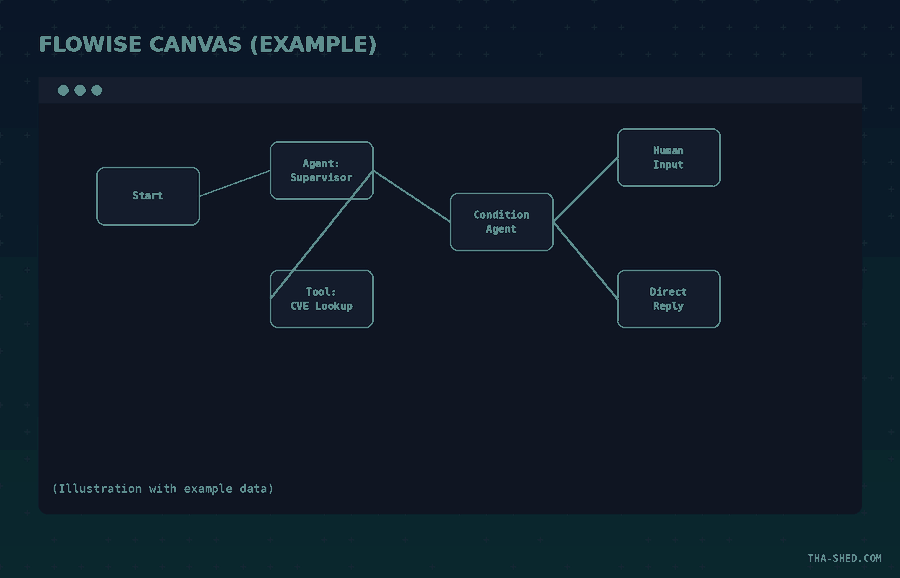
Two builders matter for DevOps and security work. Chatflow is the simpler one: single-agent chatbots and linear LLM pipelines, good for RAG lookups and structured Q&A. Agentflow (currently V2) is the one you actually want for anything with judgment calls in it. It gives you explicit nodes for conditions, loops, human-in-the-loop approval gates, and a shared "Flow State" object that lets non-adjacent nodes pass data to each other without threading it through every step in between. If n8n is where you automate "when X happens, do Y," Agentflow is where you automate "figure out what to do, then do it, and ask me first if it's risky."
Quick Setup
You've got two real paths: Flowise Cloud, or self-hosting the open source core for free. For a first pass, self-hosting locally takes about five minutes if you've got Node 18.15+ or Node 20 installed.
npm install -g flowise
npx flowise start
Open http://localhost:3000 and you're in the builder. If you want it running somewhere persistent instead of your laptop, clone the repo, copy .env.example to .env in the docker folder, and run docker compose up -d. Either way you get the full Agentflow, Chatflow, and Assistant builders, API access, and an embeddable chat widget, with zero license fees. You only pay for your own server and whatever LLM you wire in.
The Mindset: Stop Building a Chain, Build a Flow State
The mistake people make coming from a scripting background is treating Flowise like a visual for-loop. It's not. The thing that actually makes Agentflow useful is Flow State, a runtime key-value store you declare in the Start node and every later node can read or update. Once you stop passing data node-to-node and start writing to shared state, branches stop being isolated islands. A condition node can fork the workflow three ways, and all three branches can still see what an earlier LLM node decided, without you rewiring a single connector.
Second mindset shift: default to requiring human approval on anything that touches production. Flowise's Human Input node pauses execution, checkpoints it, and waits for you to click proceed or reject, even across an app restart. That's the same "ask before acting" pattern Claude uses with MCP tools, and for DevOps and security work it's not optional polish, it's the difference between an agent that saves you time and one that quietly nukes a firewall rule at 2am.
7 Workflows Worth Stealing

1. RAG runbook assistant for on-call
Point a Document Store node at your runbooks and postmortems, wrap it in a Chatflow with a Retriever node, and expose it as an embedded widget in your incident channel. Example prompt to test it: "Our checkout service is returning 503s under load, what's the documented mitigation and who owns the rollback?" It answers from your actual docs instead of guessing.
2. Supervisor/worker triage crew for security alerts
Agentflow supports agent-to-agent delegation natively. Build a Supervisor agent that reads an incoming alert, and two Worker agents, one that checks known CVEs against your asset inventory, one that pulls recent auth logs. Supervisor prompt: "Classify this alert as noise, needs-review, or page-oncall, and justify it using both workers' findings."
3. MCP-connected infra agent
Agentflow can attach MCP tools directly to the workflow, not just as agent-callable functions. Wire in the official GitHub MCP server and give an Agent node a goal like "open a PR that pins the vulnerable dependency version and tag the security team," and let it use the MCP tool calls to actually do it, with a Human Input node gating the final PR creation.
4. Automated PR review with a Custom Function node
Use an HTTP node to pull the diff from your Git provider's API, feed it to an LLM node with a security-review system prompt, then a Custom Function node to format findings as a structured comment body before another HTTP node posts it back. Example system prompt: "Flag hardcoded secrets, missing input validation, and unsafe deserialization only. Ignore style."
5. Human-in-the-loop change approval
For anything resembling a production change, chain a Condition Agent node ("is this change high-risk?") into a Human Input node before an Execute Flow node fires the actual deployment sub-flow. Nothing ships without a real click from a real person when the model flags it risky.
6. Log anomaly triage pipeline
HTTP node pulls recent logs from your aggregator's API, an LLM node scores them for anomalies against a baseline description you provide, and a Condition node routes anything above threshold into the triage crew from workflow #2. Everything under threshold gets a Direct Reply node that just logs "reviewed, clean" and stops.
7. Self-hosted internal ops chatbot
Take workflow #1's runbook assistant, add a couple of Tool nodes for read-only infra queries (uptime checks, deploy status), and ship it as Flowise's embedded chat widget on an internal ops dashboard. Your team gets a Slack-less way to ask "is prod healthy" without paging anyone.
Where Flowise Bites You
Self-hosting means you're the one patching Flowise itself, backing up its database, and rotating the credentials it stores for your LLM providers and integrations. Read up on the security controls before you connect anything to production: RBAC, SSO, encrypted credentials, and restricted domains are all there, but none of them are on by default just because you installed the thing.
Watch loop nodes closely. The Loop Node has a max iteration count that defaults to 5 specifically to stop runaway cycles, but if you raise it without thinking, a flaky condition can burn through your LLM budget in minutes. And Flow State only persists for the life of one execution. If you're expecting it to remember something across separate conversations or separate runs, it won't, you need a real memory or vector store for that.
Last one: never give an Agent node a tool that can mutate infrastructure without also setting that tool's "Require Human Input" flag. It's one checkbox and it's the entire safety net.
What It Actually Costs
The self-hosted open source core has no license fee, period. Budget for a small VPS if you're not running it on something you already have. Flowise Cloud, if you'd rather not manage the server, runs a free tier (2 flows, 100 predictions a month), a Starter tier around $35 a month for 10,000 predictions, and a Pro tier around $65 a month for 50,000 predictions with team workspaces. Either way, that subscription number is not your real bill. Every prediction still calls out to OpenAI, Anthropic, or whichever model you wired in, and on a busy internal tool that LLM API line item will dwarf whatever Flowise itself costs you. Model your token spend before you turn on a workflow that fires on every log line.

FAQ
Is Flowise the same thing as n8n?
No. n8n is built around a huge library of pre-built app integrations and trigger-based automation. Flowise is purpose-built for LLM and agent orchestration, with native agent-to-agent delegation, human-in-the-loop checkpoints, and MCP tools wired directly into the flow. If you're already deep in n8n workflows, Flowise is worth adding specifically for the agent reasoning parts, not replacing n8n outright.
Do I need to know LangChain to use it?
No, that's the point. Flowise sits on top of LangChain and LlamaIndex so you get their model and vector store integrations without writing Python. If you've already worked through a LangGraph tutorial, the node-based mental model will feel familiar, just visual instead of code.
Can I run Flowise fully air-gapped?
Yes. Self-hosted deployments support air-gapped setups, which matters if your security team won't allow outbound calls from anything touching infra data. You'll still need a locally hosted or on-prem model to keep it fully offline, since most cloud LLM providers require network access.
Get Building
Flowise is the fastest on-ramp to real agent orchestration if you don't want to hand-roll LangGraph yourself, and the self-hosted price tag of "free" makes it an easy first experiment. Start with workflow #1 this week, a RAG runbook assistant over your own docs, and only reach for Agentflow's multi-agent and human-in-the-loop nodes once that's solid. If you want structured practice with the underlying agent concepts before you touch the canvas, check out the AI Programming courses in the shed.